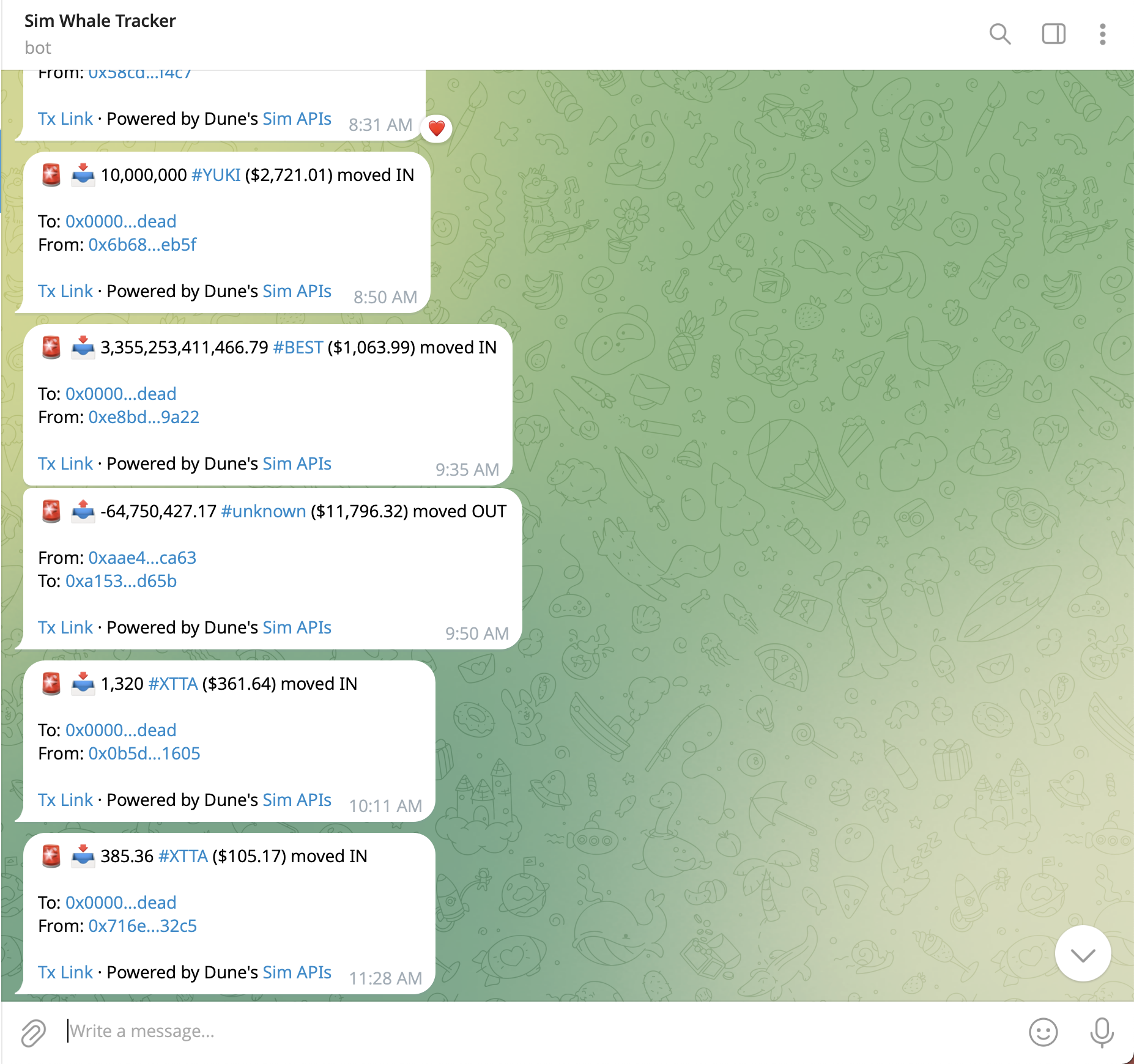
Top Token Holders Telegram Bot Interface
In this guide, you’ll build a Telegram bot that tracks the top holders of popular ERC20 tokens and sends real-time alerts when they move funds. We’ll use the Token Holders API to identify the top holders for each token, then set up the Subscriptions API to receive instant webhook notifications when those wallets move funds.

Prerequisites

Before you begin, ensure you have:

Features

By the end of this guide, your top token holders tracker will:
  1. Identify Top Token Holders - Read a CSV of popular tokens exported from Dune and find their top holders
  2. Monitor Balance Changes - Set up subscription webhooks to receive real-time balance change notifications for those wallets
  3. Send Telegram Alerts - Deliver formatted Telegram messages with transaction details
  4. Manage Subscriptions - Pause, resume, and view your webhook subscriptions

Project Setup

Let’s initialize the project.
1

Create Project Directory

mkdir top-holders-tracker
cd top-holders-tracker
npm init -y
2

Install Dependencies

We need Express, the Postgres client, and a CSV parser to handle the Dune export.
npm install express postgres csv-parse
3

Set Up Supabase

  1. Go to supabase.com/dashboard and create a new project
  2. Once created, go to Project SettingsDatabase
  3. Scroll to Connection string and select the URI tab
  4. Copy the Transaction pooler connection string (uses port 6543)
The Transaction pooler connection is recommended for serverless deployments like Vercel.
4

Set Up Environment Variables

Create a .env file in your project root:
.env
SIM_API_KEY=your_sim_api_key_here
TELEGRAM_BOT_TOKEN=your_telegram_bot_token_here
WEBHOOK_BASE_URL=https://your-deployed-url.com
DATABASE_URL=postgresql://postgres.[project-ref]:[password]@aws-0-[region].pooler.supabase.com:6543/postgres
If your database password contains special characters (!, @, #, etc.), URL-encode them. For example, @ becomes %40.
5

Create Configuration

Update your package.json to enable ES Modules and add a start script:
package.json
{
  "type": "module",
  "scripts": {
    "dev": "node index.js",
    "start": "node index.js"
  }
}
6

Initialize Server and Database

Create the entry point index.js. We initialize the database tables on startup.
index.js
import express from "express";
import postgres from "postgres";
import { setTimeout } from "node:timers/promises";
import fs from "node:fs";
import path from "node:path";
import { fileURLToPath } from "node:url";
import { parse } from "csv-parse/sync";

// ES Module directory resolution
const __filename = fileURLToPath(import.meta.url);
const __dirname = path.dirname(__filename);

// 1. Environment Setup
const SIM_API_KEY = process.env.SIM_API_KEY || "";
const TELEGRAM_BOT_TOKEN = process.env.TELEGRAM_BOT_TOKEN || "";
const WEBHOOK_BASE_URL = process.env.WEBHOOK_BASE_URL || "";
const PORT = process.env.PORT || 3001;
const DATABASE_URL = process.env.DATABASE_URL || "";

if (!SIM_API_KEY || !TELEGRAM_BOT_TOKEN || !DATABASE_URL) {
  console.error("Missing required environment variables");
  process.exit(1);
}

// 2. Database Setup (PostgreSQL via Supabase)
const sql = postgres(DATABASE_URL);

// Initialize Tables
async function initDatabase() {
  await sql`
    CREATE TABLE IF NOT EXISTS top_holders (
      id SERIAL PRIMARY KEY,
      token_address TEXT,
      chain_id INTEGER,
      symbol TEXT,
      blockchain TEXT,
      holders_json TEXT,
      UNIQUE(token_address, chain_id)
    )
  `;

  await sql`
    CREATE TABLE IF NOT EXISTS subscribers (
      chat_id TEXT PRIMARY KEY,
      subscribed_at TEXT
    )
  `;

  await sql`
    CREATE TABLE IF NOT EXISTS webhooks (
      id TEXT PRIMARY KEY,
      token_address TEXT,
      chain_id INTEGER,
      active INTEGER DEFAULT 1
    )
  `;
}

// Initialize database when module loads
initDatabase().catch(err => {
  console.error("Failed to initialize database:", err);
});

// 3. Express Setup
const app = express();
app.use(express.json()); // Parse JSON bodies

app.get("/health", (req, res) => {
  res.json({ ok: true });
});

// ... route definitions go here (added in subsequent sections) ...

// Start server for local development
// For Vercel deployment, export the app instead (see Deploy section)
const server = app.listen(PORT, () => {
  console.log(`Server running on port ${PORT}`);
});
7

Create Tables and Enable Row Level Security

In your Supabase dashboard, go to SQL Editor and run:
-- ============================================
-- 1. CREATE TABLES (Optional - app creates these automatically)
-- ============================================

CREATE TABLE IF NOT EXISTS top_holders (
id SERIAL PRIMARY KEY,
token_address TEXT,
chain_id INTEGER,
symbol TEXT,
blockchain TEXT,
holders_json TEXT,
UNIQUE(token_address, chain_id)
);

CREATE TABLE IF NOT EXISTS subscribers (
chat_id TEXT PRIMARY KEY,
subscribed_at TEXT
);

CREATE TABLE IF NOT EXISTS webhooks (
id TEXT PRIMARY KEY,
token_address TEXT,
chain_id INTEGER,
active INTEGER DEFAULT 1
);

-- ============================================
-- 2. ENABLE ROW LEVEL SECURITY (Required)
-- ============================================

ALTER TABLE top_holders ENABLE ROW LEVEL SECURITY;
ALTER TABLE subscribers ENABLE ROW LEVEL SECURITY;
ALTER TABLE webhooks ENABLE ROW LEVEL SECURITY;

-- ============================================
-- 3. CREATE PERMISSIVE POLICIES (Required)
-- ============================================

-- Drop existing policies if they exist (prevents errors on re-run)
DROP POLICY IF EXISTS "Allow all operations on top_holders" ON top_holders;
DROP POLICY IF EXISTS "Allow all operations on subscribers" ON subscribers;
DROP POLICY IF EXISTS "Allow all operations on webhooks" ON webhooks;

-- Create new policies
CREATE POLICY "Allow all operations on top_holders" ON top_holders
FOR ALL USING (true) WITH CHECK (true);

CREATE POLICY "Allow all operations on subscribers" ON subscribers
FOR ALL USING (true) WITH CHECK (true);

CREATE POLICY "Allow all operations on webhooks" ON webhooks
FOR ALL USING (true) WITH CHECK (true);

-- ============================================
-- 4. VERIFY SETUP (Run to check everything)
-- ============================================

SELECT 
tablename,
rowsecurity as "RLS Enabled"
FROM pg_tables 
WHERE schemaname = 'public' 
AND tablename IN ('top_holders', 'subscribers', 'webhooks');
This creates three tables: top_holders for storing token holder data, subscribers for Telegram chat IDs, and webhooks for tracking active subscriptions. The RLS policies allow your server full access while keeping the database secure.

Get Top ERC20 Tokens

We need a list of popular tokens to monitor. Create a file called tokens.csv in your project root with the following content:
tokens.csv
blockchain,symbol,contract_address,rank,volume_24h
abstract,WETH,0x3439153eb7af838ad19d56e1571fbd09333c2809,1,541879
arbitrum,WETH,0x82af49447d8a07e3bd95bd0d56f35241523fbab1,1,215631888
arbitrum,USDC,0xaf88d065e77c8cc2239327c5edb3a432268e5831,2,202791327
avalanche_c,USDC,0xb97ef9ef8734c71904d8002f8b6bc66dd9c48a6e,1,27753674
base,WETH,0x4200000000000000000000000000000000000006,1,384703859
base,USDC,0x833589fcd6edb6e08f4c7c32d4f71b54bda02913,2,319573649
berachain,WETH,0x2f6f07cdcf3588944bf4c42ac74ff24bf56e7590,1,1241956
bnb,USDC,0x8ac76a51cc950d9822d68b83fe1ad97b32cd580d,1,141562139
celo,USDC,0xceba9300f2b948710d2653dd7b07f33a8b32118c,1,26675517
celo,WETH,0xd221812de1bd094f35587ee8e174b07b6167d9af,2,355806
ethereum,USDC,0xa0b86991c6218b36c1d19d4a2e9eb0ce3606eb48,1,401923545
ethereum,WETH,0xc02aaa39b223fe8d0a0e5c4f27ead9083c756cc2,2,399397077
gnosis,WETH,0x6a023ccd1ff6f2045c3309768ead9e68f978f6e1,1,319235
ink,WETH,0x4200000000000000000000000000000000000006,1,632429
ink,USDC,0x2d270e6886d130d724215a266106e6832161eaed,2,181985
linea,WETH,0xe5d7c2a44ffddf6b295a15c148167daaaf5cf34f,1,3931486
linea,USDC,0x176211869ca2b568f2a7d4ee941e073a821ee1ff,2,3639358
mantle,WETH,0xdeaddeaddeaddeaddeaddeaddeaddeaddead1111,1,2213930
mantle,USDC,0x09bc4e0d864854c6afb6eb9a9cdf58ac190d0df9,2,173356
monad,USDC,0x754704bc059f8c67012fed69bc8a327a5aafb603,1,2548822
monad,WETH,0xee8c0e9f1bffb4eb878d8f15f368a02a35481242,2,178282
optimism,USDC,0x0b2c639c533813f4aa9d7837caf62653d097ff85,1,9659093
optimism,WETH,0x4200000000000000000000000000000000000006,2,8755339
plasma,WETH,0x9895d81bb462a195b4922ed7de0e3acd007c32cb,1,1185216
polygon,USDC,0x3c499c542cef5e3811e1192ce70d8cc03d5c3359,1,13687294
polygon,WETH,0x7ceb23fd6bc0add59e62ac25578270cff1b9f619,2,5280750
scroll,USDC,0x06efdbff2a14a7c8e15944d1f4a48f9f95f663a4,1,157489
scroll,WETH,0x5300000000000000000000000000000000000004,2,98385
sei,USDC,0xe15fc38f6d8c56af07bbcbe3baf5708a2bf42392,1,7740957
sei,WETH,0x160345fc359604fc6e70e3c5facbde5f7a9342d8,2,73158
sonic,WETH,0x50c42deacd8fc9773493ed674b675be577f2634b,1,661442
unichain,USDC,0x078d782b760474a361dda0af3839290b0ef57ad6,1,19398150
unichain,WETH,0x4200000000000000000000000000000000000006,2,4860719
zksync,WETH,0x5aea5775959fbc2557cc8789bc1bf90a239d9a91,1,293777
This CSV contains the top WETH and USDC tokens by volume across chains. To verify or explore a larger dataset, see this Dune query.

Load Token Data

We need to read this CSV file and map the blockchain names (e.g., “ethereum”) to their respective Chain IDs (e.g., 1). Add this logic to index.js:
index.js
// Helper to map Dune blockchain names to Chain IDs
function getChainId(blockchain) {
  const map = {
    abstract: 2741,
    arbitrum: 42161,
    avalanche_c: 43114,
    base: 8453,
    berachain: 80094,
    bnb: 56,
    celo: 42220,
    ethereum: 1,
    gnosis: 100,
    ink: 57073,
    linea: 59144,
    mantle: 5000,
    monad: 10143,
    optimism: 10,
    plasma: 1273227453,
    polygon: 137,
    scroll: 534352,
    sei: 1329,
    sonic: 146,
    unichain: 130,
    zksync: 324,
  };
  return map[blockchain.toLowerCase()] || null;
}

function loadTokensFromCSV() {
  try {
    const fileContent = fs.readFileSync(path.join(__dirname, "tokens.csv"), "utf-8");
    const records = parse(fileContent, {
      columns: true, // Auto-detect headers
      skip_empty_lines: true,
      trim: true,
    });
    return records;
  } catch (error) {
    console.error("Error loading tokens.csv. Make sure the file exists.", error);
    return [];
  }
}

Get Top Token Holders

Now we’ll identify the top holder addresses for each token using Sim’s Token Holders API and store them in our database.

Fetch Holders for a Token

index.js
async function fetchTokenHolders(tokenAddress, chainId, limit = 3) {
  const url = `https://api.sim.dune.com/v1/evm/token-holders/${chainId}/${tokenAddress}?limit=${limit}`;

  const response = await fetch(url, {
    headers: { "X-Sim-Api-Key": SIM_API_KEY },
  });

  if (!response.ok) {
    console.warn(`Failed to fetch holders for ${tokenAddress}: ${response.status}`);
    return [];
  }

  const data = await response.json();
  return data.holders || [];
}

Store Top Holder Addresses

This function iterates through the CSV records, fetches top holders, and saves them to the database.
index.js
async function fetchAllTopHolders() {
  const tokens = loadTokensFromCSV();
  let totalHolders = 0;

  console.log(`Processing ${tokens.length} tokens from CSV...`);

  for (const token of tokens) {
    const chainId = getChainId(token.blockchain);
    
    // Skip if we don't support this chain
    if (!chainId) continue;

    const holders = await fetchTokenHolders(token.contract_address, chainId);

    if (holders.length > 0) {
      const tokenAddress = token.contract_address.toLowerCase();
      const holdersJson = JSON.stringify(holders);
      
      await sql`
        INSERT INTO top_holders (token_address, chain_id, symbol, blockchain, holders_json)
        VALUES (${tokenAddress}, ${chainId}, ${token.symbol}, ${token.blockchain}, ${holdersJson})
        ON CONFLICT (token_address, chain_id) 
        DO UPDATE SET symbol = ${token.symbol}, blockchain = ${token.blockchain}, holders_json = ${holdersJson}
      `;
      totalHolders += holders.length;
      console.log(`Found ${holders.length} top holders for ${token.symbol}`);
    }

    // Respect rate limits: 4 requests per second
    await setTimeout(250);
  }

  return { totalHolders, tokensProcessed: tokens.length };
}

// Endpoint to trigger this manually
app.post("/setup/fetch-holders", async (req, res) => {
  try {
    const result = await fetchAllTopHolders();
    res.json({ ok: true, ...result });
  } catch (error) {
    res.status(500).json({ error: error.message });
  }
});

Set Up Webhooks

We’ll use Sim’s Subscriptions API (/beta/) to register webhooks. We use the balances subscription type.

Create a Webhook

index.js
async function createWebhook(config) {
  const url = "https://api.sim.dune.com/beta/evm/subscriptions/webhooks";

  const response = await fetch(url, {
    method: "POST",
    headers: {
      "X-Sim-Api-Key": SIM_API_KEY,
      "Content-Type": "application/json",
    },
    body: JSON.stringify(config),
  });

  if (!response.ok) {
    const error = await response.text();
    throw new Error(`Failed to create webhook: ${error}`);
  }

  return response.json();
}

Create Webhooks for All Top Holders

Iterate through our top_holders table and create a subscription for each.
index.js
async function createWebhooksForTopHolders() {
  const webhookIds = [];
  const rows = await sql`SELECT * FROM top_holders`;

  for (const row of rows) {
    const holders = JSON.parse(row.holders_json);
    const addresses = holders.map((h) => h.wallet_address).filter(Boolean);

    if (addresses.length === 0) continue;

    const webhook = await createWebhook({
      name: `Top Holders Tracker - ${row.symbol} on ${row.blockchain}`,
      url: `${WEBHOOK_BASE_URL}/balances`,
      type: "balances",
      addresses: addresses,
      chain_ids: [row.chain_id],
      token_address: row.token_address,
    });

    if (webhook?.id) {
      await sql`
        INSERT INTO webhooks (id, token_address, chain_id) 
        VALUES (${webhook.id}, ${row.token_address}, ${row.chain_id})
        ON CONFLICT (id) DO UPDATE SET token_address = ${row.token_address}, chain_id = ${row.chain_id}
      `;
      webhookIds.push(webhook.id);
      console.log(`Created webhook for ${row.symbol}`);
    }

    await setTimeout(250);
  }

  return { webhooksCreated: webhookIds.length, webhookIds };
}

// Endpoint to trigger webhook creation
app.post("/setup/create-webhooks", async (req, res) => {
  try {
    const result = await createWebhooksForTopHolders();
    res.json({ ok: true, ...result });
  } catch (error) {
    res.status(500).json({ error: error.message });
  }
});

Handle Balance Change Events

When a top holder moves funds, Sim sends a POST request to your webhook URL.

Process Incoming Webhooks

Add the /balances route to your Express app.
index.js
app.post("/balances", async (req, res) => {
  const balanceChanges = req.body.balance_changes || [];
  
  // Sim sends the Chain ID in the header
  const chainId = parseInt(req.headers["dune-webhook-chain-id"] || "1");
  const processedTxs = new Set();

  for (const change of balanceChanges) {
    // Deduplicate by transaction hash within this batch
    if (processedTxs.has(change.transaction_hash)) continue;
    processedTxs.add(change.transaction_hash);

    // Skip small transactions (e.g., less than $100,000)
    if (change.value_delta_usd < 100000) continue;

    // Format and send notification
    const message = formatBalanceMessage(change, chainId);
    await broadcastToSubscribers(message);
  }

  res.json({ ok: true, processed: processedTxs.size });
});

Send Telegram Notifications

Manage Subscribers

We use PostgreSQL to persist chat IDs.
index.js
async function addSubscriber(chatId) {
  const subscribedAt = new Date().toISOString();
  await sql`
    INSERT INTO subscribers (chat_id, subscribed_at) 
    VALUES (${chatId}, ${subscribedAt})
    ON CONFLICT (chat_id) DO NOTHING
  `;
}

async function getAllSubscribers() {
  const rows = await sql`SELECT chat_id FROM subscribers`;
  return rows.map(r => r.chat_id);
}

Send Messages

index.js
async function sendTelegramMessage(text, chatId) {
  const url = `https://api.telegram.org/bot${TELEGRAM_BOT_TOKEN}/sendMessage`;

  const response = await fetch(url, {
    method: "POST",
    headers: { "Content-Type": "application/json" },
    body: JSON.stringify({
      chat_id: chatId,
      text: text,
      parse_mode: "Markdown",
      disable_web_page_preview: true,
    }),
  });

  return response.ok;
}

async function broadcastToSubscribers(text) {
  const subscribers = await getAllSubscribers();
  for (const chatId of subscribers) {
    await sendTelegramMessage(text, chatId);
  }
}

Format Alert Messages

index.js
function formatNumber(value) {
  return new Intl.NumberFormat("en-US", {
    minimumFractionDigits: 0,
    maximumFractionDigits: 2,
  }).format(value);
}

function getExplorerLink(txHash, chainId) {
  const explorers = {
    1: "https://etherscan.io/tx/",
    10: "https://optimistic.etherscan.io/tx/",
    56: "https://bscscan.com/tx/",
    137: "https://polygonscan.com/tx/",
    8453: "https://basescan.org/tx/",
    42161: "https://arbiscan.io/tx/",
    43114: "https://snowtrace.io/tx/",
  };
  return `${explorers[chainId] || explorers[1]}${txHash}`;
}

function formatBalanceMessage(change, chainId) {
  const usdValue = change.value_delta_usd || 0;
  const symbol = change.asset?.symbol || "???";
  const decimals = change.asset?.decimals || 18;
  const direction = change.direction;

  // Calculate token amount
  const rawAmount = parseFloat(change.amount_delta);
  const amount = rawAmount / Math.pow(10, decimals);

  // Determine emoji count based on value
  let emojiCount = 1;
  if (usdValue >= 10_000_000) emojiCount = 5;
  else if (usdValue >= 1_000_000) emojiCount = 4;
  else if (usdValue >= 500_000) emojiCount = 3;
  else if (usdValue >= 100_000) emojiCount = 2;

  const emoji = "🚨 ".repeat(emojiCount).trim();
  const directionEmoji = direction === "in" ? "📥" : "📤";
  const directionText = direction === "in" ? "received" : "sent";

  const holder = change.subscribed_address;
  const holderShort = `${holder.slice(0, 6)}...${holder.slice(-4)}`;
  const txLink = getExplorerLink(change.transaction_hash, chainId);

  return `${emoji} ${directionEmoji} *${formatNumber(amount)} ${symbol}* ($${formatNumber(usdValue)}) ${directionText}

Holder: \`${holderShort}\`

[View Transaction](${txLink}) · Powered by [Sim APIs](https://sim.dune.com)`;
}

Handle Telegram Commands

Add the endpoint for Telegram updates.
index.js
app.post("/telegram/webhook", async (req, res) => {
  const body = req.body;
  const message = body.message;

  if (message?.text) {
    const chatId = message.chat.id.toString();
    const text = message.text;

    if (text.startsWith("/start")) {
      await addSubscriber(chatId);
      await sendTelegramMessage(
        "📊 *Welcome to Top Holders Tracker!*\n\n" +
          "You're now subscribed to top holder alerts.\n\n" +
          "Commands:\n/start - Subscribe\n/status - Check subscription",
        chatId
      );
    } else if (text.startsWith("/status")) {
      const subscribers = await getAllSubscribers();
      const isSubscribed = subscribers.includes(chatId);
      await sendTelegramMessage(
        isSubscribed
          ? "✅ You're subscribed to top holder alerts!"
          : "❌ Not subscribed. Send /start to subscribe.",
        chatId
      );
    }
  }

  res.json({ ok: true });
});

Manage Webhooks

The Subscriptions API provides endpoints to list and update your webhooks.

Pause and Resume

index.js
async function listWebhooks() {
  const url = "https://api.sim.dune.com/beta/evm/subscriptions/webhooks";
  const response = await fetch(url, {
    headers: { "X-Sim-Api-Key": SIM_API_KEY },
  });
  return response.json();
}

async function updateWebhookStatus(webhookId, active) {
  const url = `https://api.sim.dune.com/beta/evm/subscriptions/webhooks/${webhookId}`;
  const response = await fetch(url, {
    method: "PATCH",
    headers: {
      "X-Sim-Api-Key": SIM_API_KEY,
      "Content-Type": "application/json",
    },
    body: JSON.stringify({ active }),
  });
  return response.ok;
}

// Management Endpoints
app.get("/setup/view-webhooks", async (req, res) => {
  try {
    const data = await listWebhooks();
    res.json({ ok: true, ...data });
  } catch (e) {
    res.status(500).json({ error: e.message });
  }
});

app.post("/setup/pause-webhooks", async (req, res) => {
  const data = await listWebhooks();
  let paused = 0;
  for (const webhook of data.webhooks || []) {
    if (webhook.active) {
      await updateWebhookStatus(webhook.id, false);
      paused++;
      await setTimeout(100);
    }
  }
  res.json({ ok: true, paused });
});

app.post("/setup/resume-webhooks", async (req, res) => {
  const data = await listWebhooks();
  let resumed = 0;
  for (const webhook of data.webhooks || []) {
    if (!webhook.active) {
      await updateWebhookStatus(webhook.id, true);
      resumed++;
      await setTimeout(100);
    }
  }
  res.json({ ok: true, resumed });
});

Deploy and Configure

1

Start Your Server

Run your Express app:
npm start
2

Expose to Public Internet

If developing locally, use ngrok to make your localhost accessible:
ngrok http 3001
Copy the provided URL (e.g., https://abcd-123.ngrok-free.app) and update WEBHOOK_BASE_URL in your .env.
3

Register Telegram Webhook

Tell Telegram to send updates to your server:
curl -X POST "https://api.telegram.org/bot<YOUR_BOT_TOKEN>/setWebhook" \
  -H "Content-Type: application/json" \
  -d '{"url": "<YOUR_URL>/telegram/webhook"}'
4

Initialize the Tracker

Since our server is running, we can trigger the setup process using CURL or Postman:
# 1. Fetch top holder addresses from your tokens.csv
curl -X POST https://your-url.com/setup/fetch-holders

# 2. Create webhooks for monitoring
curl -X POST https://your-url.com/setup/create-webhooks
5

Subscribe to Alerts

Open your Telegram bot and send /start to begin receiving top holder alerts.

Conclusion

You’ve built a top token holders tracker bot that monitors large token holders in real-time using Sim’s Subscriptions API. The key components we covered:
  • Node.js & Express - A lightweight server for handling webhooks and Telegram commands.
  • CSV Integration - Parsing Dune Analytics data to drive your bot’s logic.
  • Supabase PostgreSQL - Cloud-hosted database for storing top holders and managing subscribers.
  • Sim APIs - Using Token Holders and Subscriptions endpoints to power the logic.
For production use, deploy your server to a platform like Vercel, Railway, or a VPS. Configuration for serverless deployment is beyond the scope of this guide, but you can reference the complete source code for a Vercel-ready setup. For more information, visit the Sim API Documentation or explore other Subscriptions API features.