> ## Documentation Index
> Fetch the complete documentation index at: https://docs.sim.dune.com/llms.txt
> Use this file to discover all available pages before exploring further.

# Show NFT Collectibles in Your Wallet

> Complete your realtime crypto wallet by adding a visual display of a user's NFT collection.

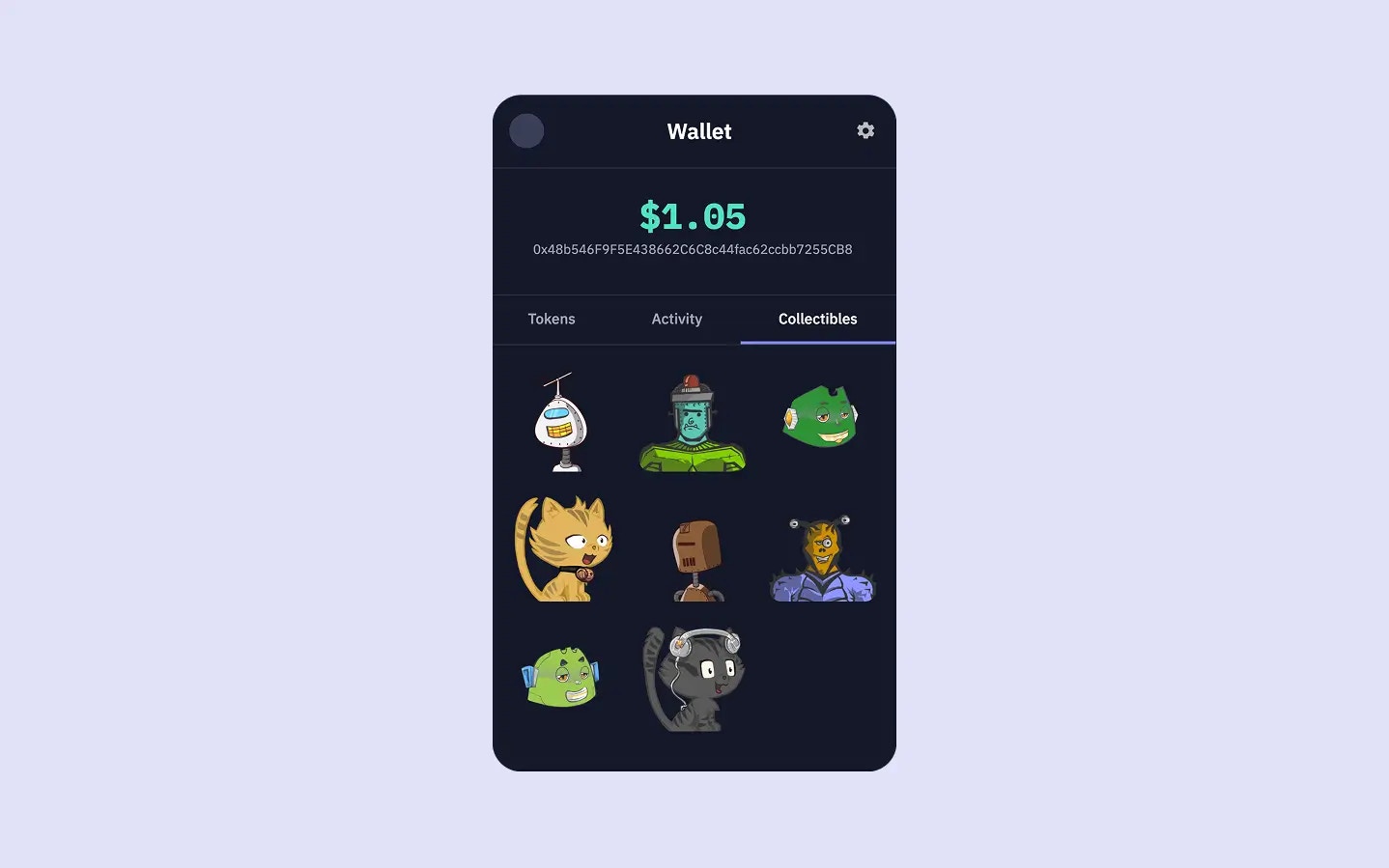
<Frame caption="The user's full NFT collection, with artwork and details, displayed in the 'Collectibles' tab.">
  <img src="https://mintcdn.com/sim-dune/FaNfto3J8NMXXVaa/images/apis/Collectibles.webp?fit=max&auto=format&n=FaNfto3J8NMXXVaa&q=85&s=990814f2b0a88e5174eacd331a6d681b" alt="" width="1438" height="899" data-path="images/apis/Collectibles.webp" />
</Frame>

Your wallet now displays token balances, calculates total portfolio value, and tracks detailed account activity.
To give users a holistic view of their onchain assets, the final piece is to **showcase their NFT collections**.
In this third and final guide of our wallet series, we will focus on implementing the *Collectibles* tab.

<Columns cols={2}>
  <Card title="View Source Code" icon="github" href="https://github.com/duneanalytics/sim-guides" horizontal>
    Access the complete source code for this wallet on GitHub
  </Card>

  <Card title="Try Live Demo" icon="globe" href="https://sim-guides.vercel.app/?walletAddress=0x48D004a6C175dB331E99BeAf64423b3098357Ae7" horizontal>
    Interact with the finished wallet app
  </Card>
</Columns>

<Note>
  This guide assumes you have completed the previous guides:

  1. [Build a Realtime Wallet](/evm/build-a-realtime-wallet)
  2. [Add Account Activity](/evm/add-account-activity)
</Note>

## Explore the NFT Collection

See the collectibles feature in action with the live demo below. Click on the "Collectibles" tab to browse the sample wallet's NFT collection:

<iframe src="https://sim-guides.vercel.app/?walletAddress=0x48D004a6C175dB331E99BeAf64423b3098357Ae7&tab=collectibles" className="w-full rounded-xl border border-gray-200 dark:border-gray-700" style={{ height: "800px" }} title="Live Wallet Demo - Collectibles Tab" frameBorder="0" allow="clipboard-write; encrypted-media" allowFullScreen />

## Fetch NFT Collectibles

Let's add a new asynchronous `getWalletCollectibles` function to `server.js` to fetch a user's NFT collection using the [Collectibles API](/evm/collectibles).

```javascript server.js (getWalletCollectibles function) {4} theme={null}
async function getWalletCollectibles(walletAddress, limit = 50) {
    if (!walletAddress) return [];

    const url = `https://api.sim.dune.com/v1/evm/collectibles/${walletAddress}?limit=${limit}`;

    try {
        const response = await fetch(url, {
            headers: {
                'X-Sim-Api-Key': SIM_API_KEY,
                'Content-Type': 'application/json'
            }
        });

        if (!response.ok) {
            const errorBody = await response.text();
            console.error(`Collectibles API request failed with status ${response.status}: ${response.statusText}`, errorBody);
            throw new Error(`Collectibles API request failed: ${response.statusText}`);
        }

        const data = await response.json();
        const collectibles = data.entries || [];
        
        // Use Sim APIs data directly
        return collectibles.map(collectible => {
            return {
                ...collectible,
                // Use collection_name field, fallback to name if not available
                collection_name: collectible.name || `Token #${collectible.token_id}`
            };
        }).filter(collectible => collectible.image_url); // Only show collectibles with images
        
    } catch (error) {
        console.error("Error fetching wallet collectibles:", error.message);
        return [];
    }
}
```

The NFT data is extracted from the `entries` array within this response, providing comprehensive information including contract addresses, token IDs, chain data, and rich metadata.

<Note>
  The [Collectibles API](/evm/collectibles) supports pagination using `limit` and `offset` query parameters.
  For wallets with many NFTs, you can implement logic to fetch subsequent pages using the `next_offset` value returned by the API to provide a complete view of the user's collection.
</Note>

## Rich NFT Data and Images

The Sim APIs [Collectibles API](/evm/collectibles) provides comprehensive NFT data including images, metadata, and collection information directly in the response.

The Collectibles API includes:

<Columns cols={2}>
  <Card title="Image URLs" icon="image" horizontal>
    Direct access to NFT artwork via `image_url` field
  </Card>

  <Card title="Metadata" icon="database" horizontal>
    Rich metadata including attributes, descriptions, and collection details
  </Card>

  <Card title="Collection Information" icon="folder" horizontal>
    Names, symbols, and collection-specific data
  </Card>

  <Card title="Acquisition Data" icon="calendar" horizontal>
    When the NFT was last acquired and sale price information
  </Card>

  <Card title="Token Details" icon="tag" horizontal>
    Contract addresses, token IDs, token standards (ERC-721, ERC-1155)
  </Card>

  <Card title="Multichain Support" icon="link" horizontal>
    NFTs from Ethereum, Polygon, Optimism, Base, and other supported chains
  </Card>
</Columns>

## Add Collectibles into the Server Route

Next, we update our main `app.get('/')` route handler in `server.js` to call this new function:

```javascript server.js (app.get('/') updated for collectibles) {16, 19, 41} theme={null}
app.get('/', async (req, res) => {
    const { 
        walletAddress = '',
        tab = 'tokens'
    } = req.query;

    let tokens = [];
    let activities = [];
    let collectibles = []; // Initialize collectibles array
    let totalWalletUSDValue = 0;
    let errorMessage = null;

    if (walletAddress) {
        try {
            // Fetch balances, activities, and collectibles concurrently for better performance
            [tokens, activities, collectibles] = await Promise.all([
                getWalletBalances(walletAddress),
                getWalletActivity(walletAddress, 25), // Fetching 25 recent activities
                getWalletCollectibles(walletAddress, 50) // Fetching up to 50 collectibles
            ]);

            // Calculate total portfolio value from token balances (Guide 1)
            if (tokens && tokens.length > 0) {
                totalWalletUSDValue = tokens.reduce((sum, token) => {
                    const value = parseFloat(token.value_usd);
                    return sum + (isNaN(value) ? 0 : value);
                }, 0);
            }
        } catch (error) {
            console.error("Error in route handler fetching all data:", error);
            errorMessage = "Failed to fetch wallet data. Please try again.";
        }
    }
    
    res.render('wallet', {
        walletAddress: walletAddress,
        currentTab: tab,
        totalWalletUSDValue: `$${totalWalletUSDValue.toFixed(2)}`,
        tokens: tokens,
        activities: activities,
        collectibles: collectibles, // Pass collectibles to the template
        errorMessage: errorMessage
    });
});
```

The route handler now fetches balances, activities, and collectibles data concurrently for optimal performance.
The `collectibles` array, containing comprehensive blockchain data and image URLs directly from Sim APIs, is passed to the `wallet.ejs` template.

## Display Collectibles in the Frontend

The final step is to modify `views/wallet.ejs` to render the fetched collectibles within the "Collectibles" tab.
We will use a grid layout to display NFT images with their collection names and token IDs.

In `views/wallet.ejs`, find the section for the "Collectibles" tab (you can search for `id="collectibles"`).
It currently contains a placeholder paragraph.
Replace that entire `div` with the following EJS:

```ejs views/wallet.ejs (Collectibles tab content) [expandable] theme={null}
<!-- Collectibles Tab Pane -->
<div id="collectibles" class="tab-pane <%= currentTab === 'collectibles' ? 'active' : '' %>">
    <% if (collectibles && collectibles.length > 0) { %>
        <div class="collectibles-grid">
            <% collectibles.forEach(collectible => { %>
                 <div class="collectible-item-link">
                    <div class="collectible-item">
                        <div class="collectible-image-container">
                            <% if (collectible.image_url) { %>
                                <img src="<%= collectible.image_url %>" alt="<%= collectible.collection_name || collectible.name || 'NFT' %>" class="collectible-image">
                            <% } else { %>
                                <div class="collectible-image-placeholder">
                                    NFT
                                </div>
                            <% } %>
                        </div>
                        <div class="collectible-info-static">
                            <div class="collectible-name">
                                <%= collectible.collection_name || collectible.name || `Token #${collectible.token_id}` %>
                            </div>
                            <div class="collectible-collection">
                                #<%= collectible.token_id.length > 10 ? collectible.token_id.substring(0, 8) + '...' : collectible.token_id %>
                            </div>
                        </div>
                    </div>
                </div>
            <% }); %>
        </div>
    <% } else if (walletAddress) { %>
        <p style="text-align: center; padding-top: 30px; color: var(--color-text-muted);">No collectibles found for this wallet.</p>
    <% } else { %>
        <p style="text-align: center; padding-top: 30px; color: var(--color-text-muted);">Enter a wallet address to see collectibles.</p>
    <% } %>
</div>
```

The EJS template iterates through the `collectibles` array and displays each NFT with its comprehensive metadata directly from Sim APIs.
Each collectible shows the `image_url`, the `collection_name` or fallback name, and a truncated `token_id` for identification.

***

Restart your server using `node server.js` and navigate to your wallet app in the browser.
When you click on the "Collectibles" tab, and if the wallet has NFTs, you should see the NFT collection displayed with rich visual metadata.

## Conclusion

That concludes this three-part series!
With just three API requests - [Balances](/evm/balances), [Activity](/evm/activity), and [Collectibles](/evm/collectibles) - you've built a fully functional, multichain wallet that displays token balances, calculates portfolio value, tracks detailed transaction activity, and showcases NFT collections with rich visual displays.

**This project serves as a solid foundation for a wallet**.
You can now expand upon it by exploring other Sim API features.
Whether you want to add more sophisticated analytics, deeper NFT insights, or advanced transaction tracking, Sim APIs provides the blockchain data you need to build the next generation of onchain apps.
