> ## Documentation Index
> Fetch the complete documentation index at: https://docs.sim.dune.com/llms.txt
> Use this file to discover all available pages before exploring further.
# Build a Top Token Holders Tracker Bot
> Create a Telegram bot that monitors and alerts you when top token holders move funds using Sim's Subscriptions API
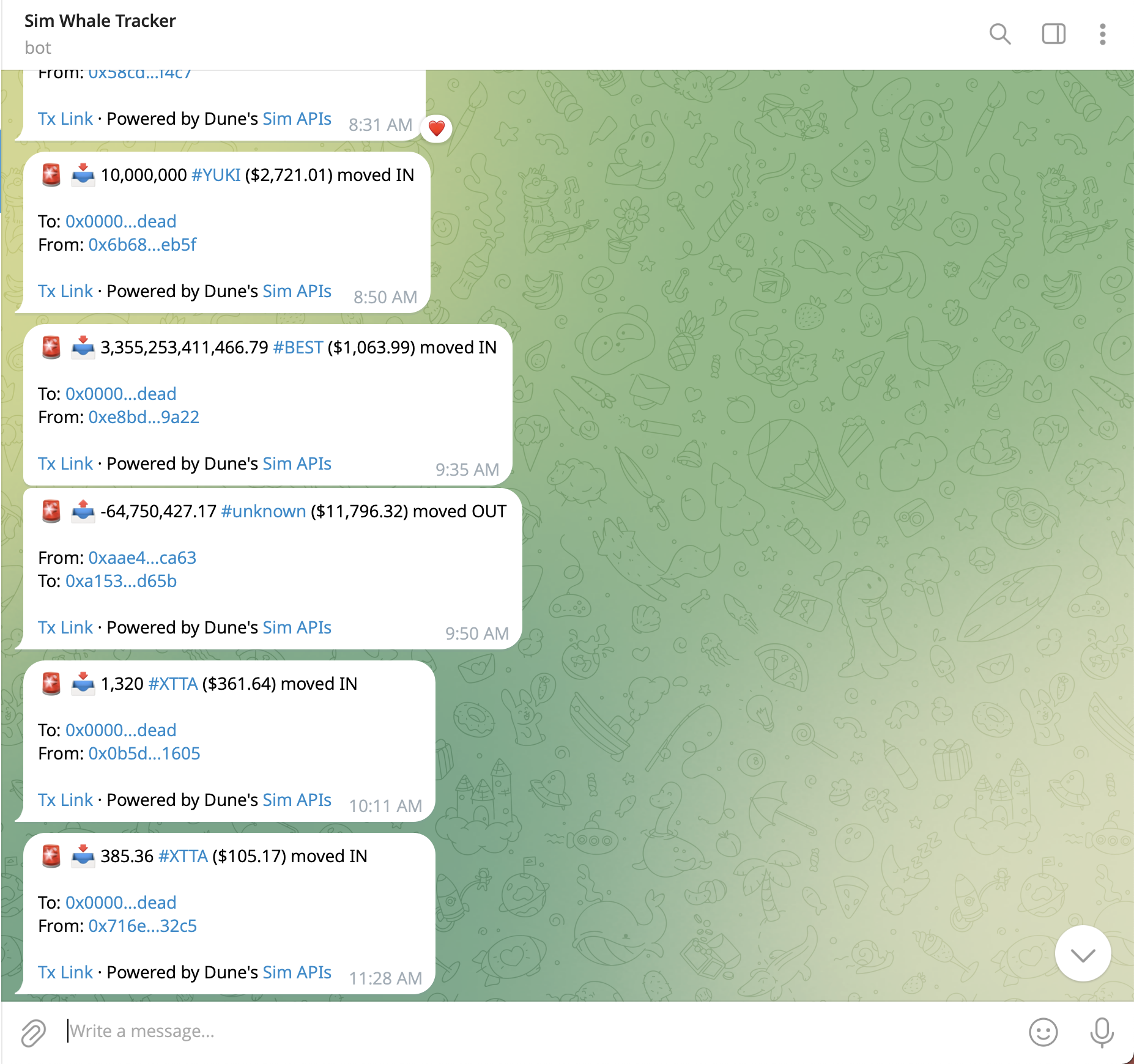 In this guide, you'll build a Telegram bot that tracks the top holders of popular ERC20 tokens and sends real-time alerts when they move funds.
We'll use the [Token Holders API](/evm/token-holders) to identify the top holders for each token, then set up the [Subscriptions API](/evm/subscriptions) to receive instant webhook notifications when those wallets move funds.
Access the complete source code for this bot on GitHub
Interact with the finished bot on Telegram
## Prerequisites
Before you begin, ensure you have:
* **Node.js** - v22 or later
* **Sim API Key** - [Get your API key](https://sim.dune.com)
* **Telegram Bot Token** - Create one via [@BotFather](https://t.me/botfather)
* **Supabase Account** - [Create a free account](https://supabase.com)
* **ngrok Account** - [Create a free account](https://dashboard.ngrok.com) for local development
## Features
By the end of this guide, your top token holders tracker will:
1. **Identify Top Token Holders** - Read a CSV of popular tokens exported from Dune and find their top holders
2. **Monitor Balance Changes** - Set up subscription webhooks to receive real-time balance change notifications for those wallets
3. **Send Telegram Alerts** - Deliver formatted Telegram messages with transaction details
4. **Manage Subscriptions** - Pause, resume, and view your webhook subscriptions
## Project Setup
Let's initialize the project.
```bash theme={null}
mkdir top-holders-tracker
cd top-holders-tracker
npm init -y
```
We need Express, the Postgres client, and a CSV parser to handle the Dune export.
```bash theme={null}
npm install express postgres csv-parse
```
1. Go to [supabase.com/dashboard](https://supabase.com/dashboard) and click **Create a new project**
2. Fill in your project details (project name, database password, region) and click **Create new project**
3. Once created, click **Connect** in the top navigation bar
4. Select the **Connection string** tab, then choose type **URI**
5. Select **Transaction pooler** and copy the connection string
6. Replace `[YOUR-PASSWORD]` with your [URL-encoded](https://www.urlencoder.org/) database password
The Transaction pooler connection is recommended for serverless deployments like Vercel.
Create a `.env` file in your project root:
```env .env theme={null}
SIM_API_KEY=your_sim_api_key_here
TELEGRAM_BOT_TOKEN=your_telegram_bot_token_here
WEBHOOK_BASE_URL=https://your-deployed-url.com
DATABASE_URL=postgresql://postgres.[project-ref]:[password]@aws-0-[region].pooler.supabase.com:6543/postgres
```
If your database password contains special characters (`!`, `@`, `#`, etc.), URL-encode them. For example, `@` becomes `%40`.
Update your `package.json` to enable ES Modules and add a start script:
```json package.json theme={null}
{
"type": "module",
"scripts": {
"dev": "node --env-file=.env index.js",
"start": "node --env-file=.env index.js"
}
}
```
Create the entry point `index.js`. We initialize the database tables on startup.
```javascript index.js expandable theme={null}
import express from "express";
import postgres from "postgres";
import { setTimeout } from "node:timers/promises";
import fs from "node:fs";
import path from "node:path";
import { fileURLToPath } from "node:url";
import { parse } from "csv-parse/sync";
// ES Module directory resolution
const __filename = fileURLToPath(import.meta.url);
const __dirname = path.dirname(__filename);
// 1. Environment Setup
const SIM_API_KEY = process.env.SIM_API_KEY || "";
const TELEGRAM_BOT_TOKEN = process.env.TELEGRAM_BOT_TOKEN || "";
const WEBHOOK_BASE_URL = process.env.WEBHOOK_BASE_URL || "";
const PORT = process.env.PORT || 3001;
const DATABASE_URL = process.env.DATABASE_URL || "";
if (!SIM_API_KEY || !TELEGRAM_BOT_TOKEN || !DATABASE_URL) {
console.error("Missing required environment variables");
process.exit(1);
}
// 2. Database Setup (PostgreSQL via Supabase)
const sql = postgres(DATABASE_URL);
// Initialize Tables
async function initDatabase() {
await sql`
CREATE TABLE IF NOT EXISTS top_holders (
id SERIAL PRIMARY KEY,
token_address TEXT,
chain_id INTEGER,
symbol TEXT,
blockchain TEXT,
holders_json TEXT,
UNIQUE(token_address, chain_id)
)
`;
await sql`
CREATE TABLE IF NOT EXISTS subscribers (
chat_id TEXT PRIMARY KEY,
subscribed_at TEXT
)
`;
await sql`
CREATE TABLE IF NOT EXISTS webhooks (
id TEXT PRIMARY KEY,
token_address TEXT,
chain_id INTEGER,
active INTEGER DEFAULT 1
)
`;
}
// Initialize database when module loads
initDatabase().catch(err => {
console.error("Failed to initialize database:", err);
});
// 3. Express Setup
const app = express();
app.use(express.json()); // Parse JSON bodies
app.get("/health", (req, res) => {
res.json({ ok: true });
});
// ... route definitions go here (added in subsequent sections) ...
// Start server for local development
// For Vercel deployment, export the app instead (see Deploy section)
const server = app.listen(PORT, () => {
console.log(`Server running on port ${PORT}`);
});
```
The application creates tables automatically on startup, but you need to enable Row Level Security (RLS) policies in the Supabase dashboard. Go to **SQL Editor** and run:
```sql expandable theme={null}
-- ============================================
-- 1. ENABLE ROW LEVEL SECURITY (Required)
-- ============================================
ALTER TABLE top_holders ENABLE ROW LEVEL SECURITY;
ALTER TABLE subscribers ENABLE ROW LEVEL SECURITY;
ALTER TABLE webhooks ENABLE ROW LEVEL SECURITY;
-- ============================================
-- 2. CREATE PERMISSIVE POLICIES (Required)
-- ============================================
-- Drop existing policies if they exist (prevents errors on re-run)
DROP POLICY IF EXISTS "Allow all operations on top_holders" ON top_holders;
DROP POLICY IF EXISTS "Allow all operations on subscribers" ON subscribers;
DROP POLICY IF EXISTS "Allow all operations on webhooks" ON webhooks;
-- Create new policies
CREATE POLICY "Allow all operations on top_holders" ON top_holders
FOR ALL USING (true) WITH CHECK (true);
CREATE POLICY "Allow all operations on subscribers" ON subscribers
FOR ALL USING (true) WITH CHECK (true);
CREATE POLICY "Allow all operations on webhooks" ON webhooks
FOR ALL USING (true) WITH CHECK (true);
-- ============================================
-- 3. VERIFY SETUP (Run to check everything)
-- ============================================
SELECT
tablename,
rowsecurity as "RLS Enabled"
FROM pg_tables
WHERE schemaname = 'public'
AND tablename IN ('top_holders', 'subscribers', 'webhooks');
```
These RLS policies allow your server full access while keeping the database secure.
## Build the Bot
With the project set up, we'll now implement the core functionality: loading token data, fetching top holders from Sim's Token Holders API, setting up webhook subscriptions, and wiring everything to Telegram.
We need a list of popular tokens to monitor. Create a file called `tokens.csv` in your project root with the following content:
```csv tokens.csv expandable theme={null}
blockchain,symbol,contract_address,rank,volume_24h
abstract,WETH,0x3439153eb7af838ad19d56e1571fbd09333c2809,1,541879
arbitrum,WETH,0x82af49447d8a07e3bd95bd0d56f35241523fbab1,1,215631888
arbitrum,USDC,0xaf88d065e77c8cc2239327c5edb3a432268e5831,2,202791327
avalanche_c,USDC,0xb97ef9ef8734c71904d8002f8b6bc66dd9c48a6e,1,27753674
base,WETH,0x4200000000000000000000000000000000000006,1,384703859
base,USDC,0x833589fcd6edb6e08f4c7c32d4f71b54bda02913,2,319573649
berachain,WETH,0x2f6f07cdcf3588944bf4c42ac74ff24bf56e7590,1,1241956
bnb,USDC,0x8ac76a51cc950d9822d68b83fe1ad97b32cd580d,1,141562139
celo,USDC,0xceba9300f2b948710d2653dd7b07f33a8b32118c,1,26675517
celo,WETH,0xd221812de1bd094f35587ee8e174b07b6167d9af,2,355806
ethereum,USDC,0xa0b86991c6218b36c1d19d4a2e9eb0ce3606eb48,1,401923545
ethereum,WETH,0xc02aaa39b223fe8d0a0e5c4f27ead9083c756cc2,2,399397077
gnosis,WETH,0x6a023ccd1ff6f2045c3309768ead9e68f978f6e1,1,319235
ink,WETH,0x4200000000000000000000000000000000000006,1,632429
ink,USDC,0x2d270e6886d130d724215a266106e6832161eaed,2,181985
linea,WETH,0xe5d7c2a44ffddf6b295a15c148167daaaf5cf34f,1,3931486
linea,USDC,0x176211869ca2b568f2a7d4ee941e073a821ee1ff,2,3639358
mantle,WETH,0xdeaddeaddeaddeaddeaddeaddeaddeaddead1111,1,2213930
mantle,USDC,0x09bc4e0d864854c6afb6eb9a9cdf58ac190d0df9,2,173356
monad,USDC,0x754704bc059f8c67012fed69bc8a327a5aafb603,1,2548822
monad,WETH,0xee8c0e9f1bffb4eb878d8f15f368a02a35481242,2,178282
optimism,USDC,0x0b2c639c533813f4aa9d7837caf62653d097ff85,1,9659093
optimism,WETH,0x4200000000000000000000000000000000000006,2,8755339
plasma,WETH,0x9895d81bb462a195b4922ed7de0e3acd007c32cb,1,1185216
polygon,USDC,0x3c499c542cef5e3811e1192ce70d8cc03d5c3359,1,13687294
polygon,WETH,0x7ceb23fd6bc0add59e62ac25578270cff1b9f619,2,5280750
scroll,USDC,0x06efdbff2a14a7c8e15944d1f4a48f9f95f663a4,1,157489
scroll,WETH,0x5300000000000000000000000000000000000004,2,98385
sei,USDC,0xe15fc38f6d8c56af07bbcbe3baf5708a2bf42392,1,7740957
sei,WETH,0x160345fc359604fc6e70e3c5facbde5f7a9342d8,2,73158
sonic,WETH,0x50c42deacd8fc9773493ed674b675be577f2634b,1,661442
unichain,USDC,0x078d782b760474a361dda0af3839290b0ef57ad6,1,19398150
unichain,WETH,0x4200000000000000000000000000000000000006,2,4860719
zksync,WETH,0x5aea5775959fbc2557cc8789bc1bf90a239d9a91,1,293777
```
This CSV contains the top WETH and USDC tokens by volume across chains. To verify or explore a larger dataset, see [this Dune query](https://dune.com/queries/6355954).
### Load Token Data
We need to read this CSV file and map the blockchain names (e.g., "ethereum") to their respective Chain IDs (e.g., 1).
Add this logic to `index.js`:
```javascript index.js expandable theme={null}
// Helper to map Dune blockchain names to Chain IDs
function getChainId(blockchain) {
const map = {
abstract: 2741,
arbitrum: 42161,
avalanche_c: 43114,
base: 8453,
berachain: 80094,
bnb: 56,
celo: 42220,
ethereum: 1,
gnosis: 100,
ink: 57073,
linea: 59144,
mantle: 5000,
monad: 10143,
optimism: 10,
plasma: 1273227453,
polygon: 137,
scroll: 534352,
sei: 1329,
sonic: 146,
unichain: 130,
zksync: 324,
};
return map[blockchain.toLowerCase()] || null;
}
function loadTokensFromCSV() {
try {
const fileContent = fs.readFileSync(path.join(__dirname, "tokens.csv"), "utf-8");
const records = parse(fileContent, {
columns: true, // Auto-detect headers
skip_empty_lines: true,
trim: true,
});
return records;
} catch (error) {
console.error("Error loading tokens.csv. Make sure the file exists.", error);
return [];
}
}
```
Now we'll identify the top holder addresses for each token using Sim's Token Holders API and store them in our database.
### Fetch Holders for a Token
```javascript index.js expandable theme={null}
async function fetchTokenHolders(tokenAddress, chainId, limit = 3) {
const url = `https://api.sim.dune.com/v1/evm/token-holders/${chainId}/${tokenAddress}?limit=${limit}`;
const response = await fetch(url, {
headers: { "X-Sim-Api-Key": SIM_API_KEY },
});
if (!response.ok) {
console.warn(`Failed to fetch holders for ${tokenAddress}: ${response.status}`);
return [];
}
const data = await response.json();
return data.holders || [];
}
```
### Store Top Holder Addresses
This function iterates through the CSV records, fetches top holders, and saves them to the database.
```javascript index.js expandable theme={null}
async function fetchAllTopHolders() {
const tokens = loadTokensFromCSV();
let totalHolders = 0;
console.log(`Processing ${tokens.length} tokens from CSV...`);
for (const token of tokens) {
const chainId = getChainId(token.blockchain);
// Skip if we don't support this chain
if (!chainId) continue;
const holders = await fetchTokenHolders(token.contract_address, chainId);
if (holders.length > 0) {
const tokenAddress = token.contract_address.toLowerCase();
const holdersJson = JSON.stringify(holders);
await sql`
INSERT INTO top_holders (token_address, chain_id, symbol, blockchain, holders_json)
VALUES (${tokenAddress}, ${chainId}, ${token.symbol}, ${token.blockchain}, ${holdersJson})
ON CONFLICT (token_address, chain_id)
DO UPDATE SET symbol = ${token.symbol}, blockchain = ${token.blockchain}, holders_json = ${holdersJson}
`;
totalHolders += holders.length;
console.log(`Found ${holders.length} top holders for ${token.symbol}`);
}
// Respect rate limits: 4 requests per second
await setTimeout(250);
}
return { totalHolders, tokensProcessed: tokens.length };
}
// Endpoint to trigger this manually
app.post("/setup/fetch-holders", async (req, res) => {
try {
const result = await fetchAllTopHolders();
res.json({ ok: true, ...result });
} catch (error) {
res.status(500).json({ error: error.message });
}
});
```
We'll use the Sim Subscriptions API (`/beta/subscriptions`) to register webhooks. We use the `balances` subscription type.
### Create a Webhook
```javascript index.js expandable theme={null}
async function createWebhook(config) {
const url = "https://api.sim.dune.com/beta/evm/subscriptions/webhooks";
const response = await fetch(url, {
method: "POST",
headers: {
"X-Sim-Api-Key": SIM_API_KEY,
"Content-Type": "application/json",
},
body: JSON.stringify(config),
});
if (!response.ok) {
const error = await response.text();
throw new Error(`Failed to create webhook: ${error}`);
}
return response.json();
}
```
### Create Webhooks for All Top Holders
Iterate through our `top_holders` table and create a subscription for each.
```javascript index.js expandable theme={null}
async function createWebhooksForTopHolders() {
const webhookIds = [];
const rows = await sql`SELECT * FROM top_holders`;
for (const row of rows) {
const holders = JSON.parse(row.holders_json);
const addresses = holders.map((h) => h.wallet_address).filter(Boolean);
if (addresses.length === 0) continue;
const webhook = await createWebhook({
name: `Top Holders Tracker - ${row.symbol} on ${row.blockchain}`,
url: `${WEBHOOK_BASE_URL}/balances`,
type: "balances",
addresses: addresses,
chain_ids: [row.chain_id],
token_address: row.token_address,
});
if (webhook?.id) {
await sql`
INSERT INTO webhooks (id, token_address, chain_id)
VALUES (${webhook.id}, ${row.token_address}, ${row.chain_id})
ON CONFLICT (id) DO UPDATE SET token_address = ${row.token_address}, chain_id = ${row.chain_id}
`;
webhookIds.push(webhook.id);
console.log(`Created webhook for ${row.symbol}`);
}
await setTimeout(250);
}
return { webhooksCreated: webhookIds.length, webhookIds };
}
// Endpoint to trigger webhook creation
app.post("/setup/create-webhooks", async (req, res) => {
try {
const result = await createWebhooksForTopHolders();
res.json({ ok: true, ...result });
} catch (error) {
res.status(500).json({ error: error.message });
}
});
```
When a top holder moves funds, Sim sends a POST request to your webhook URL.
### Process Incoming Webhooks
Add the `/balances` route to your Express app.
```javascript index.js expandable theme={null}
app.post("/balances", async (req, res) => {
const balanceChanges = req.body.balance_changes || [];
// Sim sends the Chain ID in the header
const chainId = parseInt(req.headers["dune-webhook-chain-id"] || "1");
const processedTxs = new Set();
for (const change of balanceChanges) {
// Deduplicate by transaction hash within this batch
if (processedTxs.has(change.transaction_hash)) continue;
processedTxs.add(change.transaction_hash);
// Skip small transactions (e.g., less than $100,000)
if (change.value_delta_usd < 100000) continue;
// Format and send notification
const message = formatBalanceMessage(change, chainId);
await broadcastToSubscribers(message);
}
res.json({ ok: true, processed: processedTxs.size });
});
```
### Manage Subscribers
We use PostgreSQL to persist chat IDs.
```javascript index.js theme={null}
async function addSubscriber(chatId) {
const subscribedAt = new Date().toISOString();
await sql`
INSERT INTO subscribers (chat_id, subscribed_at)
VALUES (${chatId}, ${subscribedAt})
ON CONFLICT (chat_id) DO NOTHING
`;
}
async function getAllSubscribers() {
const rows = await sql`SELECT chat_id FROM subscribers`;
return rows.map(r => r.chat_id);
}
```
### Send Messages
```javascript index.js expandable theme={null}
async function sendTelegramMessage(text, chatId) {
const url = `https://api.telegram.org/bot${TELEGRAM_BOT_TOKEN}/sendMessage`;
const response = await fetch(url, {
method: "POST",
headers: { "Content-Type": "application/json" },
body: JSON.stringify({
chat_id: chatId,
text: text,
parse_mode: "Markdown",
disable_web_page_preview: true,
}),
});
return response.ok;
}
async function broadcastToSubscribers(text) {
const subscribers = await getAllSubscribers();
for (const chatId of subscribers) {
await sendTelegramMessage(text, chatId);
}
}
```
### Format Alert Messages
```javascript index.js expandable theme={null}
function formatNumber(value) {
return new Intl.NumberFormat("en-US", {
minimumFractionDigits: 0,
maximumFractionDigits: 2,
}).format(value);
}
function getExplorerLink(txHash, chainId) {
const explorers = {
1: "https://etherscan.io/tx/",
10: "https://optimistic.etherscan.io/tx/",
56: "https://bscscan.com/tx/",
137: "https://polygonscan.com/tx/",
8453: "https://basescan.org/tx/",
42161: "https://arbiscan.io/tx/",
43114: "https://snowtrace.io/tx/",
};
return `${explorers[chainId] || explorers[1]}${txHash}`;
}
function formatBalanceMessage(change, chainId) {
const usdValue = change.value_delta_usd || 0;
const symbol = change.asset?.symbol || "???";
const decimals = change.asset?.decimals || 18;
const direction = change.direction;
// Calculate token amount
const rawAmount = parseFloat(change.amount_delta);
const amount = rawAmount / Math.pow(10, decimals);
// Determine emoji count based on value
let emojiCount = 1;
if (usdValue >= 10_000_000) emojiCount = 5;
else if (usdValue >= 1_000_000) emojiCount = 4;
else if (usdValue >= 500_000) emojiCount = 3;
else if (usdValue >= 100_000) emojiCount = 2;
const emoji = "🚨 ".repeat(emojiCount).trim();
const directionEmoji = direction === "in" ? "📥" : "📤";
const directionText = direction === "in" ? "received" : "sent";
const holder = change.subscribed_address;
const holderShort = `${holder.slice(0, 6)}...${holder.slice(-4)}`;
const txLink = getExplorerLink(change.transaction_hash, chainId);
return `${emoji} ${directionEmoji} *${formatNumber(amount)} ${symbol}* ($${formatNumber(usdValue)}) ${directionText}
Holder: \`${holderShort}\`
[View Transaction](${txLink}) · Powered by [Sim APIs](https://sim.dune.com)`;
}
```
### Handle Telegram Commands
Add the endpoint for Telegram updates.
```javascript index.js expandable theme={null}
app.post("/telegram/webhook", async (req, res) => {
const body = req.body;
const message = body.message;
if (message?.text) {
const chatId = message.chat.id.toString();
const text = message.text;
if (text.startsWith("/start")) {
await addSubscriber(chatId);
await sendTelegramMessage(
"📊 *Welcome to Top Holders Tracker!*\n\n" +
"You're now subscribed to top holder alerts.\n\n" +
"Commands:\n/start - Subscribe\n/status - Check subscription",
chatId
);
} else if (text.startsWith("/status")) {
const subscribers = await getAllSubscribers();
const isSubscribed = subscribers.includes(chatId);
await sendTelegramMessage(
isSubscribed
? "✅ You're subscribed to top holder alerts!"
: "❌ Not subscribed. Send /start to subscribe.",
chatId
);
}
}
res.json({ ok: true });
});
```
The Subscriptions API provides endpoints to list and update your webhooks.
### Pause and Resume
```javascript index.js expandable theme={null}
async function listWebhooks() {
const url = "https://api.sim.dune.com/beta/evm/subscriptions/webhooks";
const response = await fetch(url, {
headers: { "X-Sim-Api-Key": SIM_API_KEY },
});
return response.json();
}
async function updateWebhookStatus(webhookId, active) {
const url = `https://api.sim.dune.com/beta/evm/subscriptions/webhooks/${webhookId}`;
const response = await fetch(url, {
method: "PATCH",
headers: {
"X-Sim-Api-Key": SIM_API_KEY,
"Content-Type": "application/json",
},
body: JSON.stringify({ active }),
});
return response.ok;
}
// Management Endpoints
app.get("/setup/view-webhooks", async (req, res) => {
try {
const data = await listWebhooks();
res.json({ ok: true, ...data });
} catch (e) {
res.status(500).json({ error: e.message });
}
});
app.post("/setup/pause-webhooks", async (req, res) => {
const data = await listWebhooks();
let paused = 0;
for (const webhook of data.webhooks || []) {
if (webhook.active) {
await updateWebhookStatus(webhook.id, false);
paused++;
await setTimeout(250);
}
}
res.json({ ok: true, paused });
});
app.post("/setup/resume-webhooks", async (req, res) => {
const data = await listWebhooks();
let resumed = 0;
for (const webhook of data.webhooks || []) {
if (!webhook.active) {
await updateWebhookStatus(webhook.id, true);
resumed++;
await setTimeout(250);
}
}
res.json({ ok: true, resumed });
});
```
## Deploy and Configure
Run your Express app:
```bash theme={null}
npm start
```
If developing locally, you can expose a port to the public internet so that Sim Subscriptions can call it. [ngrok](https://ngrok.com) is a utility that helps with that. You need an account on [dashboard.ngrok.com](https://dashboard.ngrok.com) to use it.
```bash theme={null}
ngrok http 3001
```
Copy the provided URL (e.g., `https://abcd-123.ngrok-free.app`) and update `WEBHOOK_BASE_URL` in your `.env`.
Tell Telegram to send updates to your server:
```bash theme={null}
curl -X POST "https://api.telegram.org/bot/setWebhook" \
-H "Content-Type: application/json" \
-d '{"url": "/telegram/webhook"}'
```
Since our server is running, we can trigger the setup process using CURL or Postman:
```bash theme={null}
# 1. Fetch top holder addresses from your tokens.csv
curl -X POST https://your-url.com/setup/fetch-holders
# 2. Create webhooks for monitoring
curl -X POST https://your-url.com/setup/create-webhooks
```
Open your Telegram bot and send `/start` to begin receiving top holder alerts.
## Conclusion
You've built a top token holders tracker bot that monitors large token holders in real-time using Sim's Subscriptions API. The key components we covered:
* **Node.js & Express** - A lightweight server for handling webhooks and Telegram commands.
* **CSV Integration** - Parsing Dune Analytics data to drive your bot's logic.
* **Supabase PostgreSQL** - Cloud-hosted database for storing top holders and managing subscribers.
* **Sim APIs** - Using Token Holders and Subscriptions endpoints to power the logic.
For production use, deploy your server to a platform like Vercel, Railway, or a VPS. Configuration for serverless deployment is beyond the scope of this guide, but you can reference the [complete source code](https://github.com/dericksozo/sim-top-token-holders-tracker-telegram-bot) for a Vercel-ready setup.
For more information, visit the [Sim API Documentation](https://docs.sim.dune.com) or explore other [Subscriptions API features](https://docs.sim.dune.com/evm/subscriptions).
In this guide, you'll build a Telegram bot that tracks the top holders of popular ERC20 tokens and sends real-time alerts when they move funds.
We'll use the [Token Holders API](/evm/token-holders) to identify the top holders for each token, then set up the [Subscriptions API](/evm/subscriptions) to receive instant webhook notifications when those wallets move funds.
Access the complete source code for this bot on GitHub
Interact with the finished bot on Telegram
## Prerequisites
Before you begin, ensure you have:
* **Node.js** - v22 or later
* **Sim API Key** - [Get your API key](https://sim.dune.com)
* **Telegram Bot Token** - Create one via [@BotFather](https://t.me/botfather)
* **Supabase Account** - [Create a free account](https://supabase.com)
* **ngrok Account** - [Create a free account](https://dashboard.ngrok.com) for local development
## Features
By the end of this guide, your top token holders tracker will:
1. **Identify Top Token Holders** - Read a CSV of popular tokens exported from Dune and find their top holders
2. **Monitor Balance Changes** - Set up subscription webhooks to receive real-time balance change notifications for those wallets
3. **Send Telegram Alerts** - Deliver formatted Telegram messages with transaction details
4. **Manage Subscriptions** - Pause, resume, and view your webhook subscriptions
## Project Setup
Let's initialize the project.
```bash theme={null}
mkdir top-holders-tracker
cd top-holders-tracker
npm init -y
```
We need Express, the Postgres client, and a CSV parser to handle the Dune export.
```bash theme={null}
npm install express postgres csv-parse
```
1. Go to [supabase.com/dashboard](https://supabase.com/dashboard) and click **Create a new project**
2. Fill in your project details (project name, database password, region) and click **Create new project**
3. Once created, click **Connect** in the top navigation bar
4. Select the **Connection string** tab, then choose type **URI**
5. Select **Transaction pooler** and copy the connection string
6. Replace `[YOUR-PASSWORD]` with your [URL-encoded](https://www.urlencoder.org/) database password
The Transaction pooler connection is recommended for serverless deployments like Vercel.
Create a `.env` file in your project root:
```env .env theme={null}
SIM_API_KEY=your_sim_api_key_here
TELEGRAM_BOT_TOKEN=your_telegram_bot_token_here
WEBHOOK_BASE_URL=https://your-deployed-url.com
DATABASE_URL=postgresql://postgres.[project-ref]:[password]@aws-0-[region].pooler.supabase.com:6543/postgres
```
If your database password contains special characters (`!`, `@`, `#`, etc.), URL-encode them. For example, `@` becomes `%40`.
Update your `package.json` to enable ES Modules and add a start script:
```json package.json theme={null}
{
"type": "module",
"scripts": {
"dev": "node --env-file=.env index.js",
"start": "node --env-file=.env index.js"
}
}
```
Create the entry point `index.js`. We initialize the database tables on startup.
```javascript index.js expandable theme={null}
import express from "express";
import postgres from "postgres";
import { setTimeout } from "node:timers/promises";
import fs from "node:fs";
import path from "node:path";
import { fileURLToPath } from "node:url";
import { parse } from "csv-parse/sync";
// ES Module directory resolution
const __filename = fileURLToPath(import.meta.url);
const __dirname = path.dirname(__filename);
// 1. Environment Setup
const SIM_API_KEY = process.env.SIM_API_KEY || "";
const TELEGRAM_BOT_TOKEN = process.env.TELEGRAM_BOT_TOKEN || "";
const WEBHOOK_BASE_URL = process.env.WEBHOOK_BASE_URL || "";
const PORT = process.env.PORT || 3001;
const DATABASE_URL = process.env.DATABASE_URL || "";
if (!SIM_API_KEY || !TELEGRAM_BOT_TOKEN || !DATABASE_URL) {
console.error("Missing required environment variables");
process.exit(1);
}
// 2. Database Setup (PostgreSQL via Supabase)
const sql = postgres(DATABASE_URL);
// Initialize Tables
async function initDatabase() {
await sql`
CREATE TABLE IF NOT EXISTS top_holders (
id SERIAL PRIMARY KEY,
token_address TEXT,
chain_id INTEGER,
symbol TEXT,
blockchain TEXT,
holders_json TEXT,
UNIQUE(token_address, chain_id)
)
`;
await sql`
CREATE TABLE IF NOT EXISTS subscribers (
chat_id TEXT PRIMARY KEY,
subscribed_at TEXT
)
`;
await sql`
CREATE TABLE IF NOT EXISTS webhooks (
id TEXT PRIMARY KEY,
token_address TEXT,
chain_id INTEGER,
active INTEGER DEFAULT 1
)
`;
}
// Initialize database when module loads
initDatabase().catch(err => {
console.error("Failed to initialize database:", err);
});
// 3. Express Setup
const app = express();
app.use(express.json()); // Parse JSON bodies
app.get("/health", (req, res) => {
res.json({ ok: true });
});
// ... route definitions go here (added in subsequent sections) ...
// Start server for local development
// For Vercel deployment, export the app instead (see Deploy section)
const server = app.listen(PORT, () => {
console.log(`Server running on port ${PORT}`);
});
```
The application creates tables automatically on startup, but you need to enable Row Level Security (RLS) policies in the Supabase dashboard. Go to **SQL Editor** and run:
```sql expandable theme={null}
-- ============================================
-- 1. ENABLE ROW LEVEL SECURITY (Required)
-- ============================================
ALTER TABLE top_holders ENABLE ROW LEVEL SECURITY;
ALTER TABLE subscribers ENABLE ROW LEVEL SECURITY;
ALTER TABLE webhooks ENABLE ROW LEVEL SECURITY;
-- ============================================
-- 2. CREATE PERMISSIVE POLICIES (Required)
-- ============================================
-- Drop existing policies if they exist (prevents errors on re-run)
DROP POLICY IF EXISTS "Allow all operations on top_holders" ON top_holders;
DROP POLICY IF EXISTS "Allow all operations on subscribers" ON subscribers;
DROP POLICY IF EXISTS "Allow all operations on webhooks" ON webhooks;
-- Create new policies
CREATE POLICY "Allow all operations on top_holders" ON top_holders
FOR ALL USING (true) WITH CHECK (true);
CREATE POLICY "Allow all operations on subscribers" ON subscribers
FOR ALL USING (true) WITH CHECK (true);
CREATE POLICY "Allow all operations on webhooks" ON webhooks
FOR ALL USING (true) WITH CHECK (true);
-- ============================================
-- 3. VERIFY SETUP (Run to check everything)
-- ============================================
SELECT
tablename,
rowsecurity as "RLS Enabled"
FROM pg_tables
WHERE schemaname = 'public'
AND tablename IN ('top_holders', 'subscribers', 'webhooks');
```
These RLS policies allow your server full access while keeping the database secure.
## Build the Bot
With the project set up, we'll now implement the core functionality: loading token data, fetching top holders from Sim's Token Holders API, setting up webhook subscriptions, and wiring everything to Telegram.
We need a list of popular tokens to monitor. Create a file called `tokens.csv` in your project root with the following content:
```csv tokens.csv expandable theme={null}
blockchain,symbol,contract_address,rank,volume_24h
abstract,WETH,0x3439153eb7af838ad19d56e1571fbd09333c2809,1,541879
arbitrum,WETH,0x82af49447d8a07e3bd95bd0d56f35241523fbab1,1,215631888
arbitrum,USDC,0xaf88d065e77c8cc2239327c5edb3a432268e5831,2,202791327
avalanche_c,USDC,0xb97ef9ef8734c71904d8002f8b6bc66dd9c48a6e,1,27753674
base,WETH,0x4200000000000000000000000000000000000006,1,384703859
base,USDC,0x833589fcd6edb6e08f4c7c32d4f71b54bda02913,2,319573649
berachain,WETH,0x2f6f07cdcf3588944bf4c42ac74ff24bf56e7590,1,1241956
bnb,USDC,0x8ac76a51cc950d9822d68b83fe1ad97b32cd580d,1,141562139
celo,USDC,0xceba9300f2b948710d2653dd7b07f33a8b32118c,1,26675517
celo,WETH,0xd221812de1bd094f35587ee8e174b07b6167d9af,2,355806
ethereum,USDC,0xa0b86991c6218b36c1d19d4a2e9eb0ce3606eb48,1,401923545
ethereum,WETH,0xc02aaa39b223fe8d0a0e5c4f27ead9083c756cc2,2,399397077
gnosis,WETH,0x6a023ccd1ff6f2045c3309768ead9e68f978f6e1,1,319235
ink,WETH,0x4200000000000000000000000000000000000006,1,632429
ink,USDC,0x2d270e6886d130d724215a266106e6832161eaed,2,181985
linea,WETH,0xe5d7c2a44ffddf6b295a15c148167daaaf5cf34f,1,3931486
linea,USDC,0x176211869ca2b568f2a7d4ee941e073a821ee1ff,2,3639358
mantle,WETH,0xdeaddeaddeaddeaddeaddeaddeaddeaddead1111,1,2213930
mantle,USDC,0x09bc4e0d864854c6afb6eb9a9cdf58ac190d0df9,2,173356
monad,USDC,0x754704bc059f8c67012fed69bc8a327a5aafb603,1,2548822
monad,WETH,0xee8c0e9f1bffb4eb878d8f15f368a02a35481242,2,178282
optimism,USDC,0x0b2c639c533813f4aa9d7837caf62653d097ff85,1,9659093
optimism,WETH,0x4200000000000000000000000000000000000006,2,8755339
plasma,WETH,0x9895d81bb462a195b4922ed7de0e3acd007c32cb,1,1185216
polygon,USDC,0x3c499c542cef5e3811e1192ce70d8cc03d5c3359,1,13687294
polygon,WETH,0x7ceb23fd6bc0add59e62ac25578270cff1b9f619,2,5280750
scroll,USDC,0x06efdbff2a14a7c8e15944d1f4a48f9f95f663a4,1,157489
scroll,WETH,0x5300000000000000000000000000000000000004,2,98385
sei,USDC,0xe15fc38f6d8c56af07bbcbe3baf5708a2bf42392,1,7740957
sei,WETH,0x160345fc359604fc6e70e3c5facbde5f7a9342d8,2,73158
sonic,WETH,0x50c42deacd8fc9773493ed674b675be577f2634b,1,661442
unichain,USDC,0x078d782b760474a361dda0af3839290b0ef57ad6,1,19398150
unichain,WETH,0x4200000000000000000000000000000000000006,2,4860719
zksync,WETH,0x5aea5775959fbc2557cc8789bc1bf90a239d9a91,1,293777
```
This CSV contains the top WETH and USDC tokens by volume across chains. To verify or explore a larger dataset, see [this Dune query](https://dune.com/queries/6355954).
### Load Token Data
We need to read this CSV file and map the blockchain names (e.g., "ethereum") to their respective Chain IDs (e.g., 1).
Add this logic to `index.js`:
```javascript index.js expandable theme={null}
// Helper to map Dune blockchain names to Chain IDs
function getChainId(blockchain) {
const map = {
abstract: 2741,
arbitrum: 42161,
avalanche_c: 43114,
base: 8453,
berachain: 80094,
bnb: 56,
celo: 42220,
ethereum: 1,
gnosis: 100,
ink: 57073,
linea: 59144,
mantle: 5000,
monad: 10143,
optimism: 10,
plasma: 1273227453,
polygon: 137,
scroll: 534352,
sei: 1329,
sonic: 146,
unichain: 130,
zksync: 324,
};
return map[blockchain.toLowerCase()] || null;
}
function loadTokensFromCSV() {
try {
const fileContent = fs.readFileSync(path.join(__dirname, "tokens.csv"), "utf-8");
const records = parse(fileContent, {
columns: true, // Auto-detect headers
skip_empty_lines: true,
trim: true,
});
return records;
} catch (error) {
console.error("Error loading tokens.csv. Make sure the file exists.", error);
return [];
}
}
```
Now we'll identify the top holder addresses for each token using Sim's Token Holders API and store them in our database.
### Fetch Holders for a Token
```javascript index.js expandable theme={null}
async function fetchTokenHolders(tokenAddress, chainId, limit = 3) {
const url = `https://api.sim.dune.com/v1/evm/token-holders/${chainId}/${tokenAddress}?limit=${limit}`;
const response = await fetch(url, {
headers: { "X-Sim-Api-Key": SIM_API_KEY },
});
if (!response.ok) {
console.warn(`Failed to fetch holders for ${tokenAddress}: ${response.status}`);
return [];
}
const data = await response.json();
return data.holders || [];
}
```
### Store Top Holder Addresses
This function iterates through the CSV records, fetches top holders, and saves them to the database.
```javascript index.js expandable theme={null}
async function fetchAllTopHolders() {
const tokens = loadTokensFromCSV();
let totalHolders = 0;
console.log(`Processing ${tokens.length} tokens from CSV...`);
for (const token of tokens) {
const chainId = getChainId(token.blockchain);
// Skip if we don't support this chain
if (!chainId) continue;
const holders = await fetchTokenHolders(token.contract_address, chainId);
if (holders.length > 0) {
const tokenAddress = token.contract_address.toLowerCase();
const holdersJson = JSON.stringify(holders);
await sql`
INSERT INTO top_holders (token_address, chain_id, symbol, blockchain, holders_json)
VALUES (${tokenAddress}, ${chainId}, ${token.symbol}, ${token.blockchain}, ${holdersJson})
ON CONFLICT (token_address, chain_id)
DO UPDATE SET symbol = ${token.symbol}, blockchain = ${token.blockchain}, holders_json = ${holdersJson}
`;
totalHolders += holders.length;
console.log(`Found ${holders.length} top holders for ${token.symbol}`);
}
// Respect rate limits: 4 requests per second
await setTimeout(250);
}
return { totalHolders, tokensProcessed: tokens.length };
}
// Endpoint to trigger this manually
app.post("/setup/fetch-holders", async (req, res) => {
try {
const result = await fetchAllTopHolders();
res.json({ ok: true, ...result });
} catch (error) {
res.status(500).json({ error: error.message });
}
});
```
We'll use the Sim Subscriptions API (`/beta/subscriptions`) to register webhooks. We use the `balances` subscription type.
### Create a Webhook
```javascript index.js expandable theme={null}
async function createWebhook(config) {
const url = "https://api.sim.dune.com/beta/evm/subscriptions/webhooks";
const response = await fetch(url, {
method: "POST",
headers: {
"X-Sim-Api-Key": SIM_API_KEY,
"Content-Type": "application/json",
},
body: JSON.stringify(config),
});
if (!response.ok) {
const error = await response.text();
throw new Error(`Failed to create webhook: ${error}`);
}
return response.json();
}
```
### Create Webhooks for All Top Holders
Iterate through our `top_holders` table and create a subscription for each.
```javascript index.js expandable theme={null}
async function createWebhooksForTopHolders() {
const webhookIds = [];
const rows = await sql`SELECT * FROM top_holders`;
for (const row of rows) {
const holders = JSON.parse(row.holders_json);
const addresses = holders.map((h) => h.wallet_address).filter(Boolean);
if (addresses.length === 0) continue;
const webhook = await createWebhook({
name: `Top Holders Tracker - ${row.symbol} on ${row.blockchain}`,
url: `${WEBHOOK_BASE_URL}/balances`,
type: "balances",
addresses: addresses,
chain_ids: [row.chain_id],
token_address: row.token_address,
});
if (webhook?.id) {
await sql`
INSERT INTO webhooks (id, token_address, chain_id)
VALUES (${webhook.id}, ${row.token_address}, ${row.chain_id})
ON CONFLICT (id) DO UPDATE SET token_address = ${row.token_address}, chain_id = ${row.chain_id}
`;
webhookIds.push(webhook.id);
console.log(`Created webhook for ${row.symbol}`);
}
await setTimeout(250);
}
return { webhooksCreated: webhookIds.length, webhookIds };
}
// Endpoint to trigger webhook creation
app.post("/setup/create-webhooks", async (req, res) => {
try {
const result = await createWebhooksForTopHolders();
res.json({ ok: true, ...result });
} catch (error) {
res.status(500).json({ error: error.message });
}
});
```
When a top holder moves funds, Sim sends a POST request to your webhook URL.
### Process Incoming Webhooks
Add the `/balances` route to your Express app.
```javascript index.js expandable theme={null}
app.post("/balances", async (req, res) => {
const balanceChanges = req.body.balance_changes || [];
// Sim sends the Chain ID in the header
const chainId = parseInt(req.headers["dune-webhook-chain-id"] || "1");
const processedTxs = new Set();
for (const change of balanceChanges) {
// Deduplicate by transaction hash within this batch
if (processedTxs.has(change.transaction_hash)) continue;
processedTxs.add(change.transaction_hash);
// Skip small transactions (e.g., less than $100,000)
if (change.value_delta_usd < 100000) continue;
// Format and send notification
const message = formatBalanceMessage(change, chainId);
await broadcastToSubscribers(message);
}
res.json({ ok: true, processed: processedTxs.size });
});
```
### Manage Subscribers
We use PostgreSQL to persist chat IDs.
```javascript index.js theme={null}
async function addSubscriber(chatId) {
const subscribedAt = new Date().toISOString();
await sql`
INSERT INTO subscribers (chat_id, subscribed_at)
VALUES (${chatId}, ${subscribedAt})
ON CONFLICT (chat_id) DO NOTHING
`;
}
async function getAllSubscribers() {
const rows = await sql`SELECT chat_id FROM subscribers`;
return rows.map(r => r.chat_id);
}
```
### Send Messages
```javascript index.js expandable theme={null}
async function sendTelegramMessage(text, chatId) {
const url = `https://api.telegram.org/bot${TELEGRAM_BOT_TOKEN}/sendMessage`;
const response = await fetch(url, {
method: "POST",
headers: { "Content-Type": "application/json" },
body: JSON.stringify({
chat_id: chatId,
text: text,
parse_mode: "Markdown",
disable_web_page_preview: true,
}),
});
return response.ok;
}
async function broadcastToSubscribers(text) {
const subscribers = await getAllSubscribers();
for (const chatId of subscribers) {
await sendTelegramMessage(text, chatId);
}
}
```
### Format Alert Messages
```javascript index.js expandable theme={null}
function formatNumber(value) {
return new Intl.NumberFormat("en-US", {
minimumFractionDigits: 0,
maximumFractionDigits: 2,
}).format(value);
}
function getExplorerLink(txHash, chainId) {
const explorers = {
1: "https://etherscan.io/tx/",
10: "https://optimistic.etherscan.io/tx/",
56: "https://bscscan.com/tx/",
137: "https://polygonscan.com/tx/",
8453: "https://basescan.org/tx/",
42161: "https://arbiscan.io/tx/",
43114: "https://snowtrace.io/tx/",
};
return `${explorers[chainId] || explorers[1]}${txHash}`;
}
function formatBalanceMessage(change, chainId) {
const usdValue = change.value_delta_usd || 0;
const symbol = change.asset?.symbol || "???";
const decimals = change.asset?.decimals || 18;
const direction = change.direction;
// Calculate token amount
const rawAmount = parseFloat(change.amount_delta);
const amount = rawAmount / Math.pow(10, decimals);
// Determine emoji count based on value
let emojiCount = 1;
if (usdValue >= 10_000_000) emojiCount = 5;
else if (usdValue >= 1_000_000) emojiCount = 4;
else if (usdValue >= 500_000) emojiCount = 3;
else if (usdValue >= 100_000) emojiCount = 2;
const emoji = "🚨 ".repeat(emojiCount).trim();
const directionEmoji = direction === "in" ? "📥" : "📤";
const directionText = direction === "in" ? "received" : "sent";
const holder = change.subscribed_address;
const holderShort = `${holder.slice(0, 6)}...${holder.slice(-4)}`;
const txLink = getExplorerLink(change.transaction_hash, chainId);
return `${emoji} ${directionEmoji} *${formatNumber(amount)} ${symbol}* ($${formatNumber(usdValue)}) ${directionText}
Holder: \`${holderShort}\`
[View Transaction](${txLink}) · Powered by [Sim APIs](https://sim.dune.com)`;
}
```
### Handle Telegram Commands
Add the endpoint for Telegram updates.
```javascript index.js expandable theme={null}
app.post("/telegram/webhook", async (req, res) => {
const body = req.body;
const message = body.message;
if (message?.text) {
const chatId = message.chat.id.toString();
const text = message.text;
if (text.startsWith("/start")) {
await addSubscriber(chatId);
await sendTelegramMessage(
"📊 *Welcome to Top Holders Tracker!*\n\n" +
"You're now subscribed to top holder alerts.\n\n" +
"Commands:\n/start - Subscribe\n/status - Check subscription",
chatId
);
} else if (text.startsWith("/status")) {
const subscribers = await getAllSubscribers();
const isSubscribed = subscribers.includes(chatId);
await sendTelegramMessage(
isSubscribed
? "✅ You're subscribed to top holder alerts!"
: "❌ Not subscribed. Send /start to subscribe.",
chatId
);
}
}
res.json({ ok: true });
});
```
The Subscriptions API provides endpoints to list and update your webhooks.
### Pause and Resume
```javascript index.js expandable theme={null}
async function listWebhooks() {
const url = "https://api.sim.dune.com/beta/evm/subscriptions/webhooks";
const response = await fetch(url, {
headers: { "X-Sim-Api-Key": SIM_API_KEY },
});
return response.json();
}
async function updateWebhookStatus(webhookId, active) {
const url = `https://api.sim.dune.com/beta/evm/subscriptions/webhooks/${webhookId}`;
const response = await fetch(url, {
method: "PATCH",
headers: {
"X-Sim-Api-Key": SIM_API_KEY,
"Content-Type": "application/json",
},
body: JSON.stringify({ active }),
});
return response.ok;
}
// Management Endpoints
app.get("/setup/view-webhooks", async (req, res) => {
try {
const data = await listWebhooks();
res.json({ ok: true, ...data });
} catch (e) {
res.status(500).json({ error: e.message });
}
});
app.post("/setup/pause-webhooks", async (req, res) => {
const data = await listWebhooks();
let paused = 0;
for (const webhook of data.webhooks || []) {
if (webhook.active) {
await updateWebhookStatus(webhook.id, false);
paused++;
await setTimeout(250);
}
}
res.json({ ok: true, paused });
});
app.post("/setup/resume-webhooks", async (req, res) => {
const data = await listWebhooks();
let resumed = 0;
for (const webhook of data.webhooks || []) {
if (!webhook.active) {
await updateWebhookStatus(webhook.id, true);
resumed++;
await setTimeout(250);
}
}
res.json({ ok: true, resumed });
});
```
## Deploy and Configure
Run your Express app:
```bash theme={null}
npm start
```
If developing locally, you can expose a port to the public internet so that Sim Subscriptions can call it. [ngrok](https://ngrok.com) is a utility that helps with that. You need an account on [dashboard.ngrok.com](https://dashboard.ngrok.com) to use it.
```bash theme={null}
ngrok http 3001
```
Copy the provided URL (e.g., `https://abcd-123.ngrok-free.app`) and update `WEBHOOK_BASE_URL` in your `.env`.
Tell Telegram to send updates to your server:
```bash theme={null}
curl -X POST "https://api.telegram.org/bot/setWebhook" \
-H "Content-Type: application/json" \
-d '{"url": "/telegram/webhook"}'
```
Since our server is running, we can trigger the setup process using CURL or Postman:
```bash theme={null}
# 1. Fetch top holder addresses from your tokens.csv
curl -X POST https://your-url.com/setup/fetch-holders
# 2. Create webhooks for monitoring
curl -X POST https://your-url.com/setup/create-webhooks
```
Open your Telegram bot and send `/start` to begin receiving top holder alerts.
## Conclusion
You've built a top token holders tracker bot that monitors large token holders in real-time using Sim's Subscriptions API. The key components we covered:
* **Node.js & Express** - A lightweight server for handling webhooks and Telegram commands.
* **CSV Integration** - Parsing Dune Analytics data to drive your bot's logic.
* **Supabase PostgreSQL** - Cloud-hosted database for storing top holders and managing subscribers.
* **Sim APIs** - Using Token Holders and Subscriptions endpoints to power the logic.
For production use, deploy your server to a platform like Vercel, Railway, or a VPS. Configuration for serverless deployment is beyond the scope of this guide, but you can reference the [complete source code](https://github.com/dericksozo/sim-top-token-holders-tracker-telegram-bot) for a Vercel-ready setup.
For more information, visit the [Sim API Documentation](https://docs.sim.dune.com) or explore other [Subscriptions API features](https://docs.sim.dune.com/evm/subscriptions).