> ## Documentation Index
> Fetch the complete documentation index at: https://docs.sim.dune.com/llms.txt
> Use this file to discover all available pages before exploring further.

# Build a Realtime Wallet

> Create a multichain wallet that displays realtime balances, transactions, and NFTs using Sim APIs and Express.js

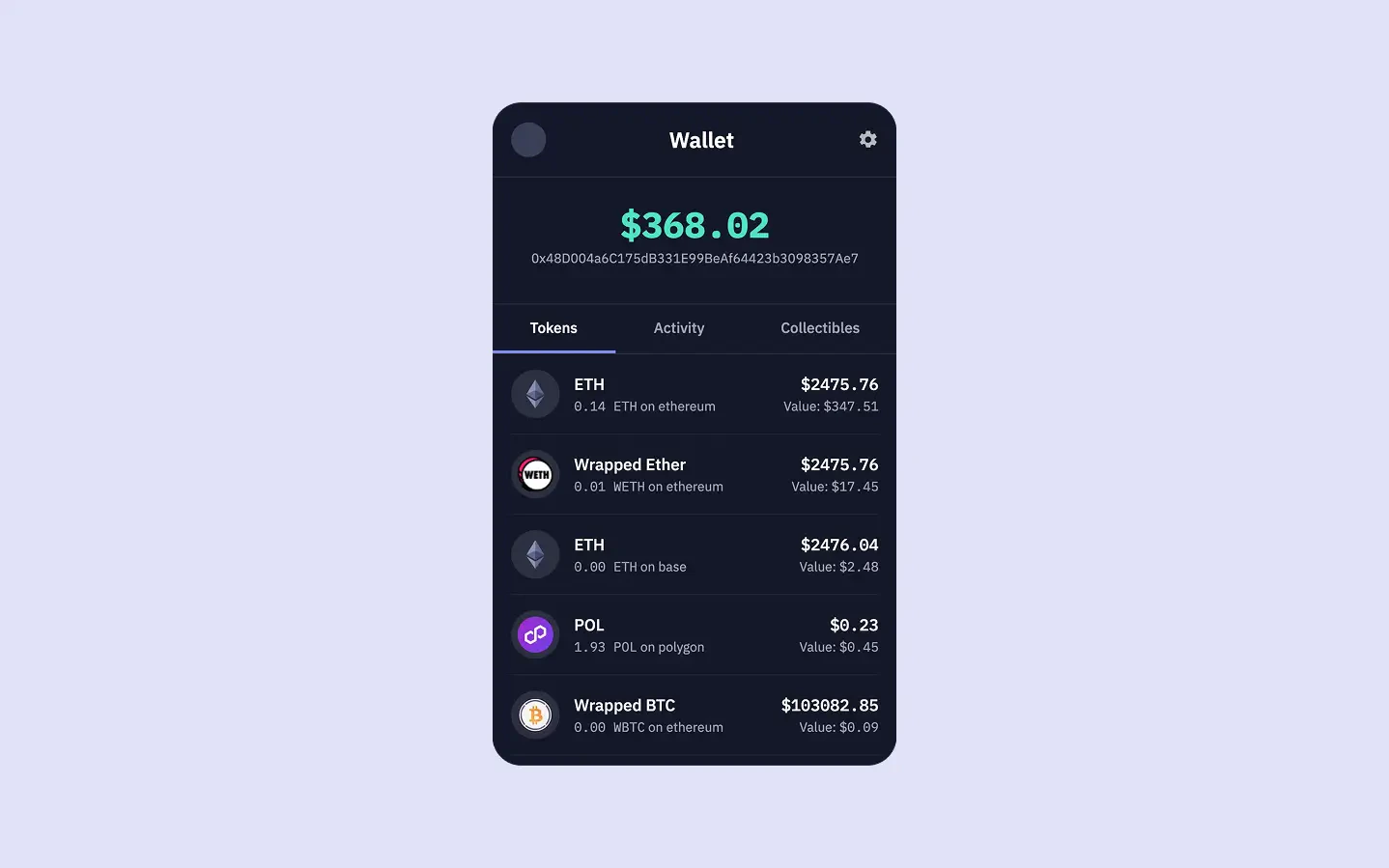
<Frame caption="The final UI we'll build together in this guide">
  <img src="https://mintcdn.com/sim-dune/FaNfto3J8NMXXVaa/images/apis/Tokens.webp?fit=max&auto=format&n=FaNfto3J8NMXXVaa&q=85&s=a20549c005206c03f65a0aef19c61091" className="mx-auto" style={{ width:"100%" }} alt="" title="" width="1438" height="899" data-path="images/apis/Tokens.webp" />
</Frame>

This is the first guide in our series on building a realtime, multichain wallet using Sim APIs.
In this one, we will lay the foundation for our wallet.
You will set up a Node project with Express.js, fetch and display token balances from 60+ EVM chains using the Balances API, and calculate the wallet's total portfolio value in USD.

<Columns cols={2}>
  <Card title="View Source Code" icon="github" href="https://github.com/duneanalytics/sim-guides/tree/main/wallet-ui" horizontal>
    Access the complete source code for this wallet on GitHub
  </Card>

  <Card title="Try Live Demo" icon="globe" href="https://sim-guides.vercel.app/?walletAddress=0x48D004a6C175dB331E99BeAf64423b3098357Ae7" horizontal>
    Interact with the finished wallet app
  </Card>
</Columns>

## Prerequisites

Before we begin, make sure you have:

* Node.js >= 18.0.0
* A Sim API key

<Card title="Get your API Key" icon="key" horizontal href="/#authentication">
  Learn how to obtain your API key to properly authenticate requests.
</Card>

## Features

By the end of this series, our wallet will have four main features:

1. **Token Balances**: Realtime balance tracking with USD values using the [Balances API](/evm/balances).
2. **Total Portfolio Value**: Aggregated USD value across all chains.
3. **Wallet Activity**: Comprehensive transaction history showing transfers and contract interactions using the [Activity API](/evm/activity)
4. **NFTs**: A display of owned NFTs using the [Collectibles API](/evm/collectibles)

<Note>
  In this first guide, we will focus on implementing the first two: **Token Balances** and **Total Portfolio Value**.
</Note>

## Try the Live Demo

Before diving into building, you can interact with the finished wallet app below.
Enter any Ethereum wallet address to explore its token balances, transaction history, and NFT collection across multiple chains.

<iframe src="https://sim-guides.vercel.app/?walletAddress=0x48D004a6C175dB331E99BeAf64423b3098357Ae7" className="w-full rounded-xl border border-gray-200 dark:border-gray-700" style={{ height: "800px" }} title="Live Wallet Demo" frameBorder="0" allow="clipboard-write; encrypted-media" allowFullScreen />

## Project Setup

Let's start by scaffolding our project.
This initial setup will provide a basic Express.js server and frontend templates, allowing us to focus on integrating Sim APIs.

<Steps>
  <Step title="Create Your Project Structure">
    Open your terminal and create a new directory for the project:

    ```bash theme={null}
    mkdir wallet-ui
    cd wallet-ui
    ```

    Now you are in the `wallet-ui` directory.
    Next, initialize a new Node.js project with npm:

    ```bash theme={null}
    npm init -y
    npm pkg set type="module"
    ```

    These commands create a `package.json` file with default values and configure it to use ES modules.
    Afterward, install the required packages:

    ```bash theme={null}
    npm install express ejs dotenv numbro
    ```

    We are using three packages for our wallet:

    * **Express.js**: A popular Node.js web framework for creating our server.
    * **EJS**: A simple templating engine that lets us generate dynamic HTML.
    * **dotenv**: A package to load environment variables from a `.env` file.
    * **numbro**: For formatting numbers and currency.
  </Step>

  <Step title="Configure Environment Variables">
    Create a new `.env` file in your project root:

    ```bash theme={null}
    touch .env
    ```

    Open the `.env` file in your code editor and add your Sim API key:

    ```plaintext .env theme={null}
    # Your Sim API key (required)
    SIM_API_KEY=your_api_key_here
    ```

    <Warning>
      Never commit your `.env` file to version control. If you are using Git, add `.env` to your `.gitignore` file.
    </Warning>
  </Step>

  <Step title="Add Starter Code">
    Create the necessary directories for views and public assets:

    ```bash theme={null}
    mkdir views
    mkdir public
    ```

    `views` will hold our EJS templates, and `public` will serve static assets like CSS.
    Now, create the core files:

    ```bash theme={null}
    touch server.js
    touch views/wallet.ejs
    touch public/styles.css
    ```

    Populate `server.js` with this basic Express server code:

    ```javascript server.js [expandable] theme={null}
    import express from 'express';
    import numbro from 'numbro';
    import dotenv from 'dotenv';
    import path from 'path';
    import { fileURLToPath } from 'url';

    // Load environment variables
    dotenv.config();
    const SIM_API_KEY = process.env.SIM_API_KEY;

    if (!SIM_API_KEY) {
        console.error("FATAL ERROR: SIM_API_KEY is not set in your environment variables.");
        process.exit(1);
    }

    // Set up __dirname for ES modules
    const __filename = fileURLToPath(import.meta.url);
    const __dirname = path.dirname(__filename);

    // Initialize Express
    const app = express();

    // Configure Express settings
    app.set('view engine', 'ejs');
    app.set('views', path.join(__dirname, 'views'));
    app.use(express.static(path.join(__dirname, 'public')));

    // Add our home route
    app.get('/', async (req, res) => {
        const { 
            walletAddress = '',
            tab = 'tokens' // Default to tokens tab
        } = req.query;

        let tokens = [];
        let totalWalletUSDValue = 0;
        let activities = []; // For Guide 2
        let collectibles = []; // For Guide 3

        // In later steps, these arrays will be populated with API data.
        res.render('wallet', {
            walletAddress: walletAddress,
            currentTab: tab,
            totalWalletUSDValue: '$0.00', // Will be calculated later in this guide.
            tokens: tokens,
            activities: activities,
            collectibles: collectibles
        });
    });

    // Start the server
    app.listen(3001, () => {
        console.log(`Server running at http://localhost:3001`);
    });
    ```

    Add the initial frontend template to `views/wallet.ejs`:

    ```ejs views/wallet.ejs [expandable] theme={null}
    <!DOCTYPE html>
    <html lang="en">
    <head>
        <meta charset="UTF-8">
        <meta name="viewport" content="width=device-width, initial-scale=1.0">
        <meta name="description" content="Sim APIs Wallet UI - A simple and elegant wallet interface for viewing crypto assets and transactions">
        <meta name="theme-color" content="#0b0e1f">
        <title>Sim APIs Wallet UI</title>
        <link rel="preconnect" href="https://fonts.googleapis.com">
        <link rel="preconnect" href="https://fonts.gstatic.com" crossorigin>
        <link href="https://fonts.googleapis.com/css2?family=IBM+Plex+Mono:wght@400;500;700&family=IBM+Plex+Sans:wght@400;500;600;700&display=swap" rel="stylesheet">
        <link rel="stylesheet" href="/styles.css">
    </head>
    <body>
    <div class="mobile-container">
        <header class="app-header">
            <div class="profile-pic-placeholder"></div>
            <div class="header-title">Wallet</div>
            <div class="settings-icon"></div>
        </header>

        <section class="total-balance-section">
            <p class="total-balance-amount"><%= totalWalletUSDValue %></p>
            <p class="total-balance-label js-wallet-address-display"><%= walletAddress || 'Enter wallet address...' %></p>
        </section>

        <nav class="tabs">
            <button class="tab-button <%= currentTab === 'tokens' ? 'active' : '' %>" data-tab="tokens">Tokens</button>
            <button class="tab-button <%= currentTab === 'activity' ? 'active' : '' %>" data-tab="activity">Activity</button>
            <button class="tab-button <%= currentTab === 'collectibles' ? 'active' : '' %>" data-tab="collectibles">Collectibles</button>
        </nav>

        <main class="tab-content">
            <!-- Tokens Tab Pane -->
            <div id="tokens" class="tab-pane <%= currentTab === 'tokens' ? 'active' : '' %>">
                <% if (tokens && tokens.length > 0) { %>
                    <% tokens.forEach(token => { %>
                        <div class="list-item">
                            <% if (token.token_metadata && token.token_metadata.logo) { %>
                                <img src="<%= token.token_metadata.logo %>" alt="<%= token.symbol || 'Token' %> Logo" class="item-icon-placeholder" style="object-fit: contain; padding: 6px;">
                            <% } else { %>
                                <div class="item-icon-placeholder"><%= token.symbol ? token.symbol.substring(0, 4) : '?' %></div>
                            <% } %>
                            <div class="item-info">
                                <% if (token.token_metadata && token.token_metadata.url) { %>
                                    <p class="item-name"><a href="<%= token.token_metadata.url %>" target="_blank" style="color: inherit; text-decoration: none;"><%= token.name || token.symbol %></a></p>
                                <% } else { %>
                                    <p class="item-name"><%= token.name || token.symbol %></p>
                                <% } %>
                            </div>
                            <div class="item-value-right">
                                <p class="item-usd-value">
                                    <strong>
                                        <%= token.valueUSDFormatted || (token.value_usd != null ? token.value_usd : 'N/A') %>
                                    </strong>
                                </p>
                                <p class="item-sub-info">
                                    <%= token.amountFormatted || token.amount %> <%= token.symbol %>
                                </p>
                            </div>
                        </div>
                    <% }); %>
                <% } else if (walletAddress) { %>
                    <p style="text-align: center; padding-top: 30px; color: var(--color-text-muted);">No tokens found for this wallet.</p>
                <% } else { %>
                    <p style="text-align: center; padding-top: 30px; color: var(--color-text-muted);">Enter a wallet address above to see token balances.</p>
                <% } %>
            </div>

           <!-- Activity Tab Pane (for Guide 2) -->
            <div id="activity" class="tab-pane <%= currentTab === 'activity' ? 'active' : '' %>">
                <p style="font-family: var(--font-primary); text-align: center; padding-top: 30px; color: var(--color-text-muted);">Activity feature will be added in the next guide.</p>
            </div>

            <!-- Collectibles Tab Pane (for Guide 3) -->
            <div id="collectibles" class="tab-pane <%= currentTab === 'collectibles' ? 'active' : '' %>">
                <p style="font-family: var(--font-primary); text-align: center; padding-top: 30px; color: var(--color-text-muted);">Collectibles feature will be added in a future guide.</p>
            </div>
        </main>
    </div>

    <script>
        const tabButtons = document.querySelectorAll('.tab-button');
        const tabPanes = document.querySelectorAll('.tab-pane');
        const walletAddressDisplay = document.querySelector(".js-wallet-address-display");

        tabButtons.forEach(button => {
            button.addEventListener('click', () => {
                const tab = button.dataset.tab;
                const currentWalletAddress = new URLSearchParams(window.location.search).get('walletAddress');
                if (currentWalletAddress) {
                    window.location.search = `?walletAddress=${currentWalletAddress}&tab=${tab}`;
                } else {
                    // If no wallet address, just switch tab visually without reload, or prompt
                    tabButtons.forEach(btn => btn.classList.remove('active'));
                    tabPanes.forEach(pane => pane.classList.remove('active'));
                    button.classList.add('active');
                    document.getElementById(tab).classList.add('active');
                }
            });
        });

        walletAddressDisplay.addEventListener('click', () => {
            let newWalletAddress = prompt("Enter wallet address:", new URLSearchParams(window.location.search).get('walletAddress') || '');
            if (newWalletAddress !== null && newWalletAddress.trim() !== "") {
                 const currentTab = new URLSearchParams(window.location.search).get('tab') || 'tokens';
                 window.location.search = `?walletAddress=${newWalletAddress.trim()}&tab=${currentTab}`;
            } else if (newWalletAddress !== null) { // Empty input, clear address
                 const currentTab = new URLSearchParams(window.location.search).get('tab') || 'tokens';
                 window.location.search = `?tab=${currentTab}`;
            }
        });

        // Set active tab based on URL param on page load
        document.addEventListener('DOMContentLoaded', () => {
            const params = new URLSearchParams(window.location.search);
            const tab = params.get('tab') || 'tokens';
            
            tabButtons.forEach(btn => btn.classList.remove('active'));
            tabPanes.forEach(pane => pane.classList.remove('active'));

            const activeButton = document.querySelector(`.tab-button[data-tab="${tab}"]`);
            const activePane = document.getElementById(tab);

            if (activeButton) activeButton.classList.add('active');
            if (activePane) activePane.classList.add('active');
        });
    </script>
    </body>
    </html>
    ```

    Add basic styles to `public/styles.css`:

    ```css public/styles.css [expandable] theme={null}
    :root {
    --font-primary: 'IBM Plex Sans', sans-serif;
    --font-mono: 'IBM Plex Mono', monospace;

    --color-bg-deep: #e1e2f9;
    --color-bg-container: #141829;
    --color-border-primary: #2c3040;
    --color-border-secondary: #222636;
    --color-text-primary: #ffffff;
    --color-text-secondary: #e0e0e0;
    --color-text-muted: #a0a3b1;
    --color-text-subtle: #808391;
    --color-accent-green: #50e3c2;
    --color-accent-purple: #7e87ef;
    --color-accent-red: #ff7875;
    --color-placeholder-bg: #3a3f58;
    }

    body {
    font-family: var(--font-primary);
    background-color: var(--color-bg-deep);
    color: var(--color-text-secondary);
    margin: 0;
    padding: 0;
    display: flex;
    justify-content: center;
    align-items: center;
    min-height: 100vh;
    padding-top: 0;
    padding-bottom: 0;
    height: 100vh;
    }

    .mobile-container {
    width: 100%;
    max-width: 420px;
    height: 90vh;
    max-height: 800px;
    min-height: 600px;
    background-color: var(--color-bg-container);
    border-radius: 20px;
    display: flex;
    flex-direction: column;
    overflow: hidden;
    align-self: center;
    box-shadow: 0 8px 32px rgba(20, 24, 41, 0.18), 0 1.5px 6px rgba(20, 24, 41, 0.10);
    }

    /* Header Styles */
    .app-header {
    display: flex;
    justify-content: space-between;
    align-items: center;
    padding: 20px;
    border-bottom: 1px solid var(--color-border-primary);
    flex-shrink: 0;
    }

    .profile-pic-placeholder {
    width: 36px;
    height: 36px;
    background-color: var(--color-placeholder-bg);
    border-radius: 50%;
    }

    .header-title {
    font-family: var(--font-primary);
    font-size: 1.4em;
    font-weight: 600; /* IBM Plex Sans SemiBold */
    color: var(--color-text-primary);
    }

    .settings-icon {
    width: 22px;
    height: 22px;
    background-image: url("data:image/svg+xml,%3Csvg xmlns='http://www.w3.org/2000/svg' viewBox='0 0 24 24' fill='%23e0e0e0'%3E%3Cpath d='M19.43 12.98c.04-.32.07-.64.07-.98s-.03-.66-.07-.98l2.11-1.65c.19-.15.24-.42.12-.64l-2-3.46c-.12-.22-.39-.3-.61-.22l-2.49 1c-.52-.4-1.08-.73-1.69-.98l-.38-2.65C14.46 2.18 14.25 2 14 2h-4c-.25 0-.46.18-.49.42l-.38 2.65c-.61.25-1.17.59-1.69.98l-2.49-1c-.23-.09-.49 0-.61.22l-2 3.46c-.13.22-.07.49.12.64l2.11 1.65c-.04.32-.07.65-.07.98s.03.66.07.98l-2.11 1.65c-.19.15-.24.42-.12-.64l2 3.46c.12.22.39.3.61.22l2.49-1c.52.4 1.08.73 1.69.98l.38 2.65c.03.24.24.42.49.42h4c.25 0 .46-.18.49.42l.38-2.65c.61-.25 1.17-.59 1.69-.98l2.49 1c.23.09.49 0 .61-.22l2-3.46c.12-.22.07-.49-.12-.64l-2.11-1.65zM12 15.5c-1.93 0-3.5-1.57-3.5-3.5s1.57-3.5 3.5-3.5 3.5 1.57 3.5 3.5-1.57 3.5-3.5 3.5z'/%3E%3C/svg%3E");
    background-repeat: no-repeat;
    background-size: contain;
    cursor: pointer;
    opacity: 0.8;
    }

    /* Total Balance Section */
    .total-balance-section {
    padding: 25px 20px;
    text-align: center;
    border-bottom: 1px solid var(--color-border-primary);
    flex-shrink: 0;
    }

    .total-balance-amount {
    font-family: var(--font-mono); /* Mono for large number */
    font-size: 2.3em;
    font-weight: 700;
    margin: 0;
    color: var(--color-accent-green);
    }
    .total-balance-label {
    font-family: var(--font-primary);
    font-size: 0.85em;
    color: var(--color-text-muted);
    margin-top: 2px;
    cursor: pointer; /* Make it look clickable */
    }
    .total-balance-label:hover {
        color: var(--color-text-primary);
    }

    /* Tabs Section */
    .tabs {
    display: flex;
    border-bottom: 1px solid var(--color-border-primary);
    flex-shrink: 0;
    position: relative;
    z-index: 1;
    }

    .tab-button {
    font-family: var(--font-primary);
    flex-grow: 1;
    padding: 14px;
    text-align: center;
    cursor: pointer;
    background-color: transparent;
    border: none;
    color: var(--color-text-muted);
    font-size: 0.95em;
    font-weight: 500; /* IBM Plex Sans Medium */
    border-bottom: 3px solid transparent;
    transition: color 0.2s ease, border-bottom-color 0.2s ease;
    }
    .tab-button:hover {
    color: var(--color-text-primary);
    }
    .tab-button.active {
    color: var(--color-text-primary);
    border-bottom: 3px solid var(--color-accent-purple);
    }

    .tab-content {
    padding: 0px 20px 20px 20px;
    flex-grow: 1;
    min-height: 0;
    max-height: calc(100vh - 220px);
    overflow-y: auto;
    }
    .tab-pane { display: none; }
    .tab-pane.active { display: block; }

    /* Tokens Tab & Activity Tab Styles */
    .list-item {
    display: flex;
    align-items: center;
    padding: 16px 0;
    border-bottom: 1px solid var(--color-border-secondary);
    }
    .list-item:last-child { border-bottom: none; }

    .item-icon-placeholder {
    width: 38px;
    height: 38px;
    background-color: #2c3040; /* Using a specific color, not var for contrast */
    border-radius: 50%;
    margin-right: 15px;
    display: flex;
    justify-content: center;
    align-items: center;
    font-family: var(--font-mono); /* Mono for symbols like ETH */
    font-weight: 500;
    font-size: 0.9em;
    color: #c0c3d1; /* Using specific color */
    flex-shrink: 0;
    overflow: hidden; /* Prevents text overflow if symbol is too long */
    }

    .item-info {
    flex-grow: 1;
    min-width: 0; /* Prevents text overflow issues in flex children */
    }
    .item-name { /* Token Name, Activity Type like "Received", "Sent" */
    font-family: var(--font-primary);
    font-size: 1.05em;
    font-weight: 500; /* IBM Plex Sans Medium */
    margin: 0 0 3px 0;
    color: var(--color-text-primary);
    white-space: nowrap;
    overflow: hidden;
    text-overflow: ellipsis;
    }
    .item-sub-info { /* "1.2345 ETH on Ethereum", "Price: $800.00" */
    font-family: var(--font-primary); /* Sans for descriptive part */
    font-size: 0.85em;
    color: var(--color-text-muted);
    margin: 0;
    white-space: nowrap;
    overflow: hidden;
    text-overflow: ellipsis;
    }
    .item-sub-info .mono { /* Span class for monospaced parts within sub-info */
    font-family: var(--font-mono);
    }

    .item-value-right {
    text-align: right;
    flex-shrink: 0;
    padding-left: 10px;
    }
    .item-usd-value { /* USD value of holding */
    font-family: var(--font-mono); /* Mono for numerical USD value */
    font-size: 1.05em;
    font-weight: 500;
    margin: 0 0 3px 0;
    color: var(--color-text-primary);
    }

    /* Activity Tab Specifics */
    .activity-direction { /* "Received ETH", "Sent USDC" */
    font-family: var(--font-primary);
    font-size: 1.05em;
    font-weight: 500; /* IBM Plex Sans Medium */
    margin: 0 0 3px 0;
    }
    .activity-direction.sent { color: var(--color-accent-red); }
    .activity-direction.receive { color: var(--color-accent-green); } /* Ensure class name consistency with JS */


    .activity-address, .activity-timestamp {
    font-family: var(--font-primary); /* Sans for "From:", "To:" */
    font-size: 0.8em;
    color: var(--color-text-subtle);
    margin: 0;
    }
    .activity-address .mono, .activity-timestamp .mono { /* For address itself and timestamp value */
     font-family: var(--font-mono);
    }
    .activity-amount-right { /* "+0.5 ETH" */
    font-family: var(--font-mono); /* Mono for amount + symbol */
    font-size: 1.05em;
    font-weight: 500;
    }
    .activity-amount-right.sent { color: var(--color-accent-red); }
    .activity-amount-right.receive { color: var(--color-accent-green); }

    /* NFT Grid Container */
    .collectibles-grid {
        display: grid;
        grid-template-columns: repeat(1, 1fr);
        gap: 1rem;
        padding-top: 20px;
        width: 100%;
    }

    /* NFT Item Container */
    .collectible-item-link {
        text-decoration: none;
        color: inherit;
        display: block;
        transition: transform 0.2s ease;
    }

    .collectible-item-link:hover {
        transform: translateY(-2px);
    }

    .collectible-item {
        position: relative;
        border-radius: 12px;
        overflow: hidden;
        background: var(--color-bg-container);
        border: 1px solid var(--color-border-secondary);
        box-shadow: 0 2px 8px rgba(0, 0, 0, 0.1);
    }

    /* Image Container */
    .collectible-image-container {
        position: relative;
        width: 100%;
        padding-bottom: 100%; /* Creates a square aspect ratio */
        background: var(--color-placeholder-bg);
    }

    .collectible-image {
        position: absolute;
        top: 0;
        left: 0;
        width: 100%;
        height: 100%;
        object-fit: cover;
    }

    /* Image Placeholder */
    .collectible-image-placeholder {
        position: absolute;
        top: 0;
        left: 0;
        width: 100%;
        height: 100%;
        display: flex;
        align-items: center;
        justify-content: center;
        background: linear-gradient(135deg, #667eea 0%, #764ba2 100%);
        color: white;
        font-family: var(--font-primary);
        font-weight: 600;
        font-size: 0.875rem;
    }

    /* NFT Info Container - Static (always visible) */
    .collectible-info-static {
        padding: 0.75rem;
        background: var(--color-bg-container);
        border-top: 1px solid var(--color-border-secondary);
    }

    /* NFT Info Container - Hover (keep for backwards compatibility but not used) */
    .collectible-info {
        position: absolute;
        bottom: 0;
        left: 0;
        right: 0;
        padding: 0.75rem;
        background: linear-gradient(transparent, rgba(0, 0, 0, 0.85));
        color: white;
        opacity: 0;
        transition: opacity 0.3s ease;
    }

    .collectible-item-link:hover .collectible-info {
        opacity: 1;
    }

    /* NFT Text Styles */
    .collectible-name {
        font-family: var(--font-primary);
        font-size: 0.9rem;
        font-weight: 600;
        margin-bottom: 0.25rem;
        white-space: nowrap;
        overflow: hidden;
        text-overflow: ellipsis;
        color: var(--color-text-primary);
    }

    .collectible-collection {
        font-family: var(--font-mono);
        font-size: 0.8rem;
        margin-bottom: 0;
        opacity: 0.9;
        white-space: nowrap;
        overflow: hidden;
        text-overflow: ellipsis;
        color: var(--color-text-muted);
    }

    .collectible-chain {
        font-family: var(--font-primary);
        font-size: 0.7rem;
        opacity: 0.8;
        color: white;
    }
    ```
  </Step>

  <Step title="Verify Project Structure">
    Run `ls` in your terminal. Your project directory `wallet-ui/` should now contain:

    ```bash theme={null}
    wallet-ui/
    ├── server.js             # Main application file with Express server
    ├── views/                # Directory for EJS templates
    │   └── wallet.ejs        # Main wallet UI template
    ├── public/               # Directory for static assets
    │   └── styles.css        # CSS styling for the wallet UI
    ├── package.json          # Project configuration
    ├── package-lock.json     # Dependency lock file (if `npm install` was run)
    ├── node_modules/         # Installed packages (if `npm install` was run)
    └── .env                  # Your environment variables
    ```
  </Step>
</Steps>

Run `node server.js` in the terminal to start the server.
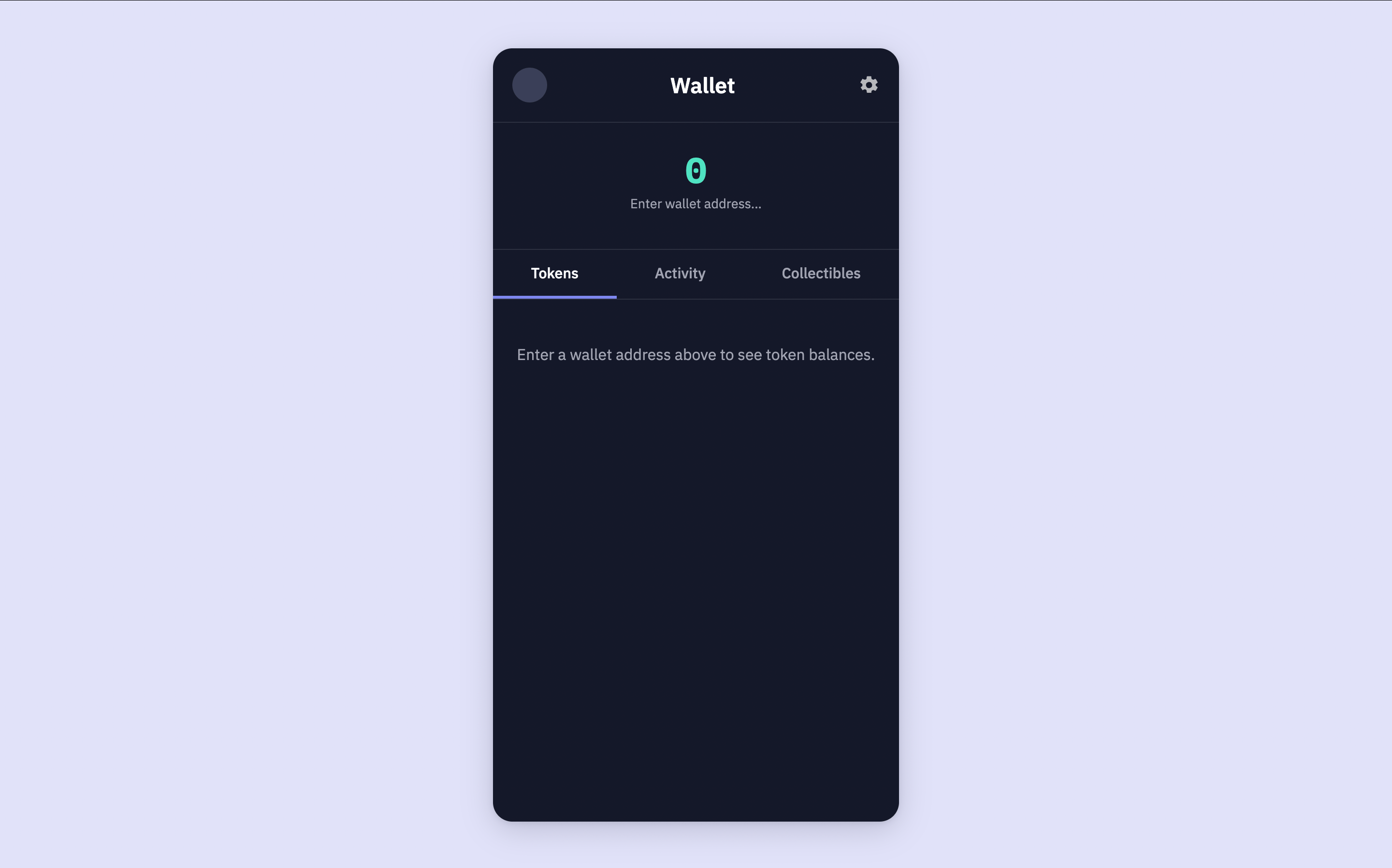
Visit `http://localhost:3001` to see the blank wallet.

<Frame caption="Our scaffolded wallet UI without any data.">
  <img src="https://mintcdn.com/sim-dune/kJVnzSzA9eavUZq6/images/wallet-ui/wallet-balances-blank.png?fit=max&auto=format&n=kJVnzSzA9eavUZq6&q=85&s=e5b40676104e6ac257ae9d58ec74e409" alt="" width="2880" height="1796" data-path="images/wallet-ui/wallet-balances-blank.png" />
</Frame>

<Warning>
  If you encounter errors, ensure your `.env` file contains the correct `SIM_API_KEY` and that it is loaded correctly.
  Also, verify the `walletAddress` in the URL is a valid EVM wallet address.
  Check your terminal for any error messages from `server.js`.
</Warning>

Now, let's integrate the Sim API to fetch real data.

## Fetch and Show Token Balances

We will use the [Balances API](/evm/balances) to get realtime token balances for a given wallet address.
This endpoint provides comprehensive details about native and ERC20 tokens, including metadata and USD values across more than 60+ EVM chains.

First, let's create an async function in `server.js` to fetch these balances. Add this function before your `app.get('/')` route handler:

```javascript server.js (getWalletBalances) {7,9,14,28} theme={null}
async function getWalletBalances(walletAddress) {
    if (!walletAddress) return []; // Return empty if no address

    // Construct the query parameters
    // metadata=url,logo fetches token URLs and logo images
    const queryParams = `metadata=url,logo`;

    const url = `https://api.sim.dune.com/v1/evm/balances/${walletAddress}?${queryParams}`;

    try {
        const response = await fetch(url, {
            headers: {
                'X-Sim-Api-Key': SIM_API_KEY, // Your API key from .env
                'Content-Type': 'application/json'
            }
        });

        if (!response.ok) {
            const errorBody = await response.text();
            console.error(`API request failed with status ${response.status}: ${response.statusText}`, errorBody);
            throw new Error(`API request failed: ${response.statusText}`);
        }

        const data = await response.json();

        // The API returns JSON with a "balances" key. We return that directly.
        return data.balances;

    } catch (error) {
        console.error("Error fetching wallet balances:", error.message);
        return []; // Return empty array on error
    }
}
```

This function creates the API request using Node's `fetch`.
It includes your `SIM_API_KEY` in the headers and sends a GET request to the `/v1/evm/balances/{address}` endpoint.

The Balances API gives you access to various [*URL query parameters*](/evm/balances) that you can include to modify the response.
We have included `metadata=url,logo` to include a token's URL and logo.

Next, modify your `app.get('/')` route handler in `server.js` to call `getWalletBalances` and pass the fetched tokens to your template:

```javascript server.js {13} theme={null}
app.get('/', async (req, res) => {
    const { 
        walletAddress = '',
        tab = 'tokens'
    } = req.query;

    let tokens = [];
    let totalWalletUSDValue = 0;
    let errorMessage = null;

    if (walletAddress) {
        try {
            tokens = await getWalletBalances(walletAddress);
        } catch (error) {
            console.error("Error in route handler:", error);
            errorMessage = "Failed to fetch wallet data. Please try again.";
            // tokens will remain empty, totalWalletUSDValue will be 0
        }
    }

    res.render('wallet', {
        walletAddress: walletAddress,
        currentTab: tab,
        totalWalletUSDValue: `$0.00`, // We'll calculate this in the next section
        tokens: tokens,
        activities: [], // Placeholder for Guide 2
        collectibles: [], // Placeholder for Guide 3
        errorMessage: errorMessage
    });
});
```

We've updated the route to:

1. Call `getWalletBalances` if a `walletAddress` is provided.
2. Pass the retrieved `balances` to the `wallet.ejs` template.

The `views/wallet.ejs` file you created earlier is already set up to display these tokens.
Restart your server with `node server.js` and refresh your browser, providing a `walletAddress` in the URL.
For example: [`http://localhost:3001/?walletAddress=0xd8da6bf26964af9d7eed9e03e53415d37aa96045`](http://localhost:3001/?walletAddress=0xd8da6bf26964af9d7eed9e03e53415d37aa96045)

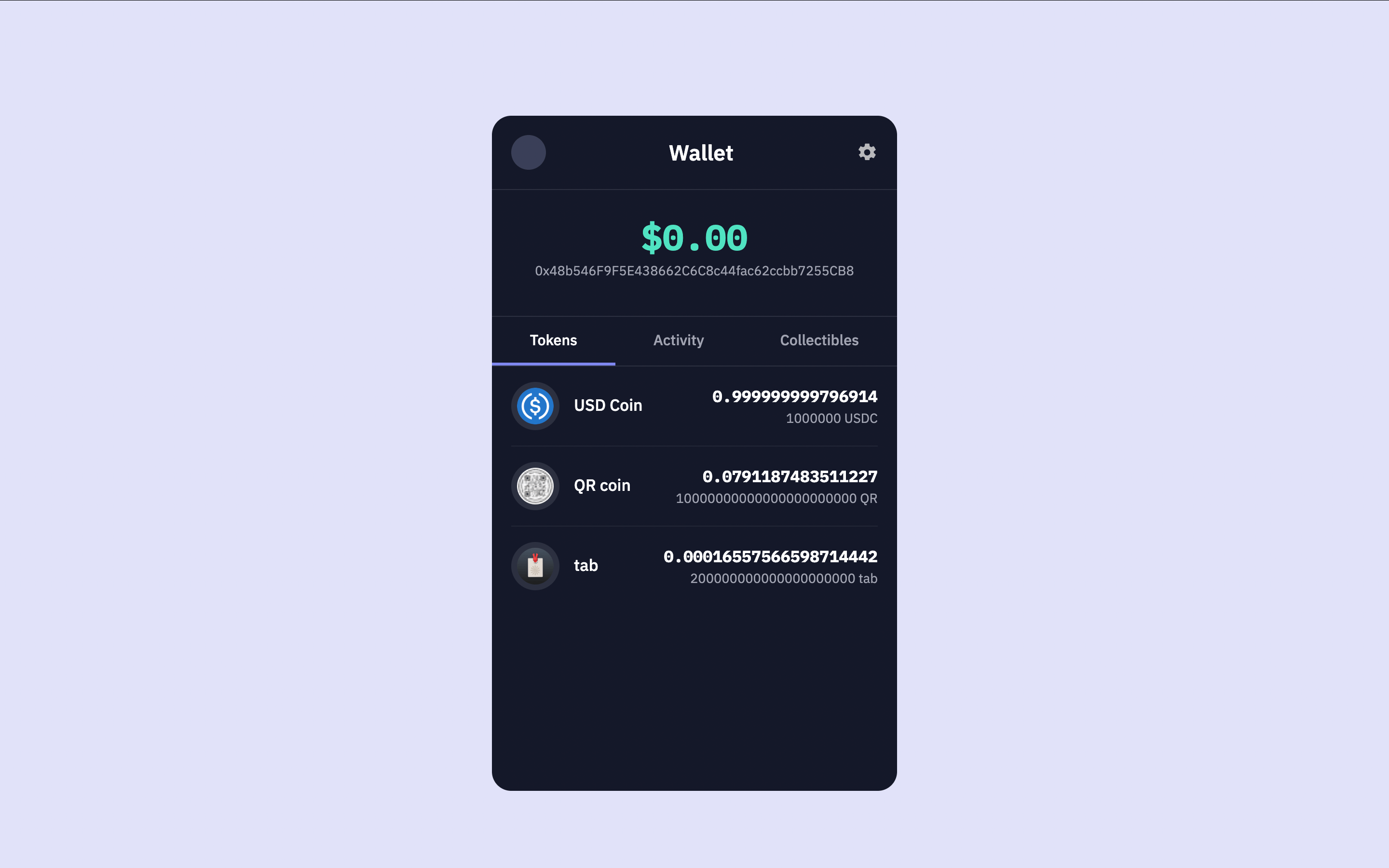
You should now see the wallet populated with token balances, logos, prices for each token, and how much of that token the wallet holds.

<Frame caption="Wallet displaying token balances (in wei) with logos and prices.">
  <img src="https://mintcdn.com/sim-dune/kJVnzSzA9eavUZq6/images/wallet-ui/wallet-balances-without-formatting.png?fit=max&auto=format&n=kJVnzSzA9eavUZq6&q=85&s=f712d433a1371d8e81f682bddb208b5c" className="mx-auto" style={{ width:"100%" }} width="2880" height="1800" data-path="images/wallet-ui/wallet-balances-without-formatting.png" />
</Frame>

## Format Balances

The Balances API returns token amounts in their smallest denomination. This will be in wei for ETH-like tokens.
To display these amounts in a user-friendly way, like `1.23` ETH instead of `1230000000000000000` wei, we need to adjust the amount using the token's `decimals` property, which is also returned from the Balances API.
We can add a new property, `balanceFormatted`, to each token object.

Modify your `getWalletBalances` function in `server.js` as follows. The main change is mapping over `data.balances` to add the `balanceFormatted` property:

```javascript server.js (getWalletBalances with formatting) {24, 25, 26, 27, 28, 29, 30, 31, 32, 33, 34, 35, 36, 37, 38} theme={null}
async function getWalletBalances(walletAddress) {
    if (!walletAddress) return []; 

    const queryParams = `metadata=url,logo`;
    const url = `https://api.sim.dune.com/v1/evm/balances/${walletAddress}?${queryParams}`;

    try {
        const response = await fetch(url, {
            headers: {
                'X-Sim-Api-Key': SIM_API_KEY,
                'Content-Type': 'application/json'
            }
        });

        if (!response.ok) {
            const errorBody = await response.text();
            console.error(`API request failed with status ${response.status}: ${response.statusText}`, errorBody);
            throw new Error(`API request failed: ${response.statusText}`);
        }

        const data = await response.json();
        
        // Return formatted values and amounts
        return (data.balances || []).map(token => {
            // 1. Calculate human-readable token amount
            const numericAmount = parseFloat(token.amount) / Math.pow(10, parseInt(token.decimals));
            // 2. Get numeric USD value
            const numericValueUSD = parseFloat(token.value_usd);
            // 3. Format using numbro
            const valueUSDFormatted = numbro(numericValueUSD).format('$0,0.00');
            const amountFormatted = numbro(numericAmount).format('0,0.[00]A');

            return {
                ...token,
                valueUSDFormatted,
                amountFormatted
            };
        }).filter(token => token.symbol !== 'RTFKT'); // Removing Spam Tokens. Add more if you like.

    } catch (error) {
        console.error("Error fetching wallet balances:", error.message);
        return []; 
    }
}
```

Now, each token object returned by `getWalletBalances` will include a `balanceFormatted` string, which our EJS template (`views/wallet.ejs`) already uses: `<%= token.balanceFormatted || token.amount %>`.

Restart the server and refresh the browser. You will now see formatted balances.
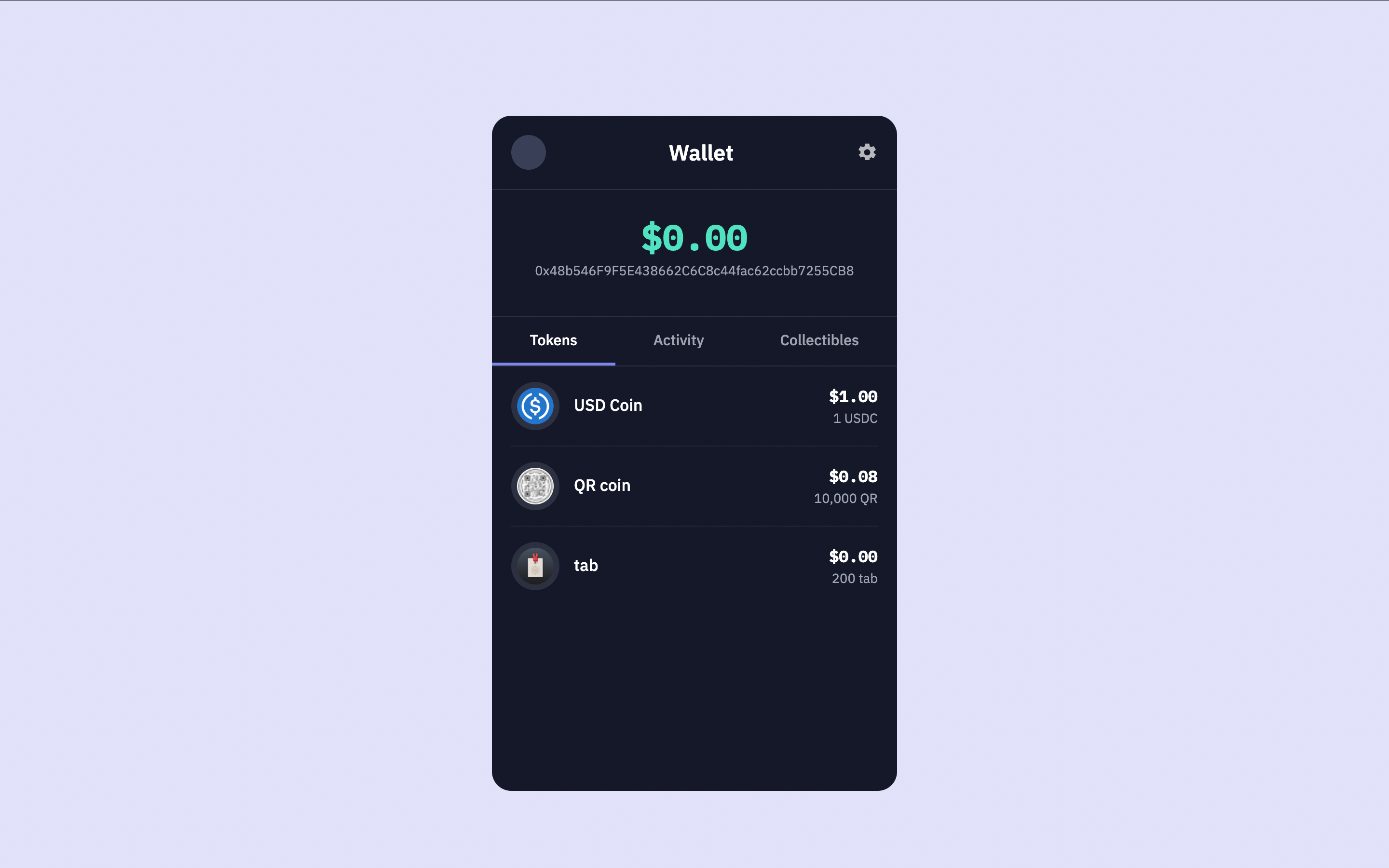
<Frame caption="Wallet displaying properly formatted token balances with logos.">
  <img src="https://mintcdn.com/sim-dune/kJVnzSzA9eavUZq6/images/wallet-ui/wallet-balances-formatted.png?fit=max&auto=format&n=kJVnzSzA9eavUZq6&q=85&s=103827232af159a71842481e0b87b1b5" className="mx-auto" style={{ width:"100%" }} width="2880" height="1800" data-path="images/wallet-ui/wallet-balances-formatted.png" />
</Frame>

## Calculate Total Portfolio Value

The wallet's total value at the top of the UI still says `$0.00`.
Let's calculate the total USD value of the wallet and properly show it.

The Balances API provides a `value_usd` field with each token.
This field represents the total U.S. dollar value of the wallet's entire holding for that specific token.

Let's modify the `app.get('/')` route handler to iterate through the fetched tokens and sum their individual `value_usd` to calculate the `totalWalletUSDValue`.

```javascript server.js (app.get('/') with total value calculation) {16, 17, 18, 19, 20, 21, 22, 23, 24, 25, 37} theme={null}
app.get('/', async (req, res) => {
    const { 
        walletAddress = '',
        tab = 'tokens'
    } = req.query;

    let tokens = [];
    let totalWalletUSDValue = 0; // Will be updated
    let errorMessage = null;

    if (walletAddress) {
        try {
            tokens = await getWalletBalances(walletAddress);

            // Calculate the total USD value from the fetched tokens
            if (tokens && tokens.length > 0) {
                tokens.forEach(token => {
                    let individualValue = parseFloat(token.value_usd);
                    if (!isNaN(individualValue)) {
                        totalWalletUSDValue += individualValue;
                    }
                });
            }
            
            totalWalletUSDValue = numbro(totalWalletUSDValue).format('$0,0.00');

        } catch (error) {
            console.error("Error in route handler:", error);
            errorMessage = "Failed to fetch wallet data. Please try again.";
            // tokens will remain empty, totalWalletUSDValue will be 0
        }
    }

    res.render('wallet', {
        walletAddress: walletAddress,
        currentTab: tab,
        totalWalletUSDValue: totalWalletUSDValue, // Pass the calculated total
        tokens: tokens,
        activities: [], // Placeholder for Guide 2
        collectibles: [], // Placeholder for Guide 3
        errorMessage: errorMessage
    });
});
```

We use the `reduce` method to iterate over the `tokens` array.
For each `token`, we access its `value_usd` property, parse it as a float, and add it to the running `sum`.
The calculated `totalWalletUSDValue` is then formatted to two decimal places and passed to the template.

The `views/wallet.ejs` template already has `<p class="total-balance-amount"><%= totalWalletUSDValue %></p>`, so it will display the calculated total correctly.
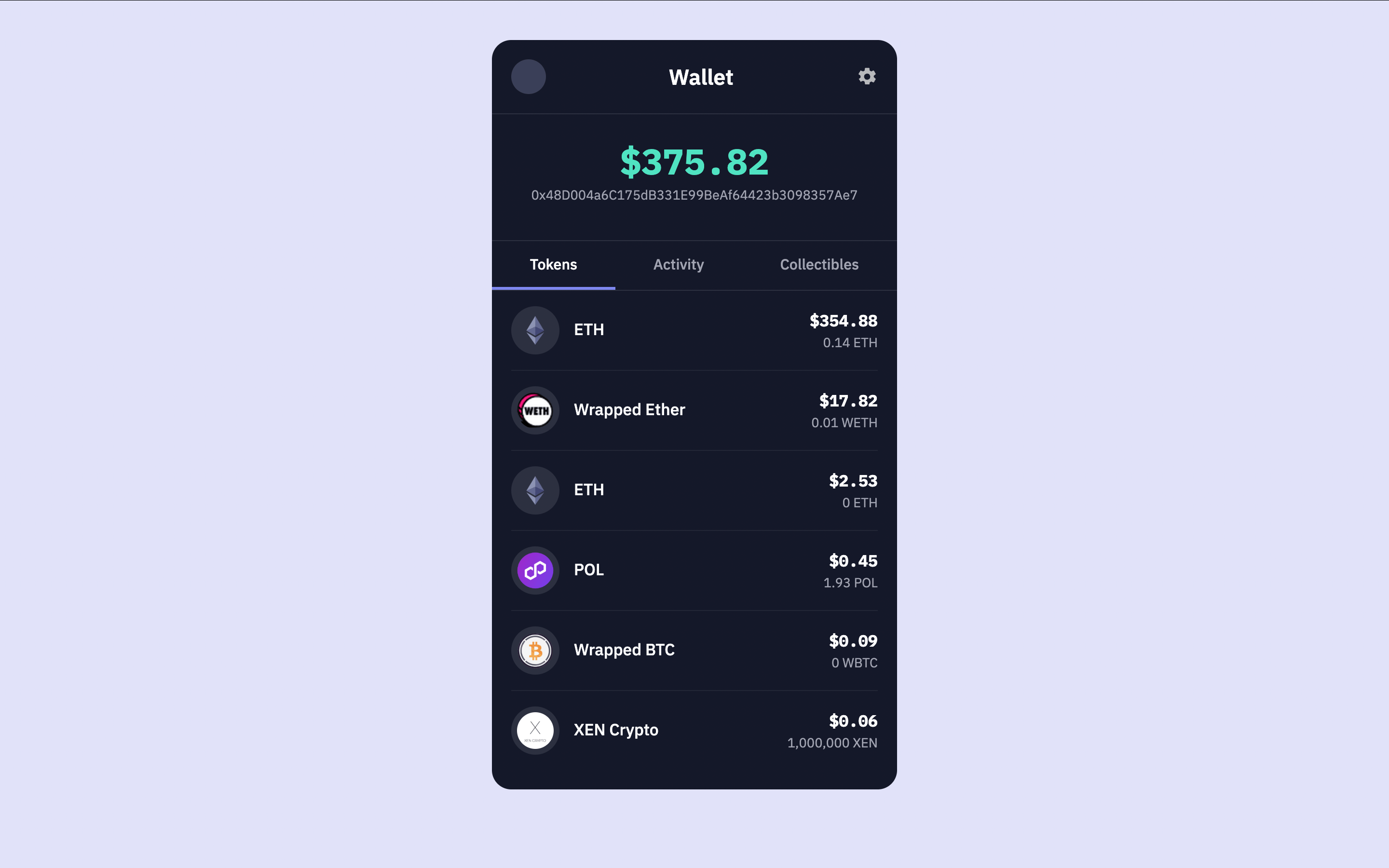
Restart your server and refresh the browser page with a wallet address.
You should now see the total wallet value at the top of the UI accurately reflecting the sum of all token balance USD values.

<Frame caption="Wallet showing the correctly calculated total USD value.">
  <img src="https://mintcdn.com/sim-dune/kJVnzSzA9eavUZq6/images/wallet-ui/wallet-balances-total-wallet-value.png?fit=max&auto=format&n=kJVnzSzA9eavUZq6&q=85&s=142890b250afed7942f702c2c517b096" className="mx-auto" style={{ width:"100%" }} width="2880" height="1800" data-path="images/wallet-ui/wallet-balances-total-wallet-value.png" />
</Frame>

## Add Historical Price Tracking

Now let's improve the wallet by showing price movement over time. Historical price context helps users understand how their tokens are gaining or losing value. The [Balances API](/evm/balances) can return historical price points when you include the `historical_prices` query parameter, which lets you display price changes for any hour offset from 1 to 24 hours ago.
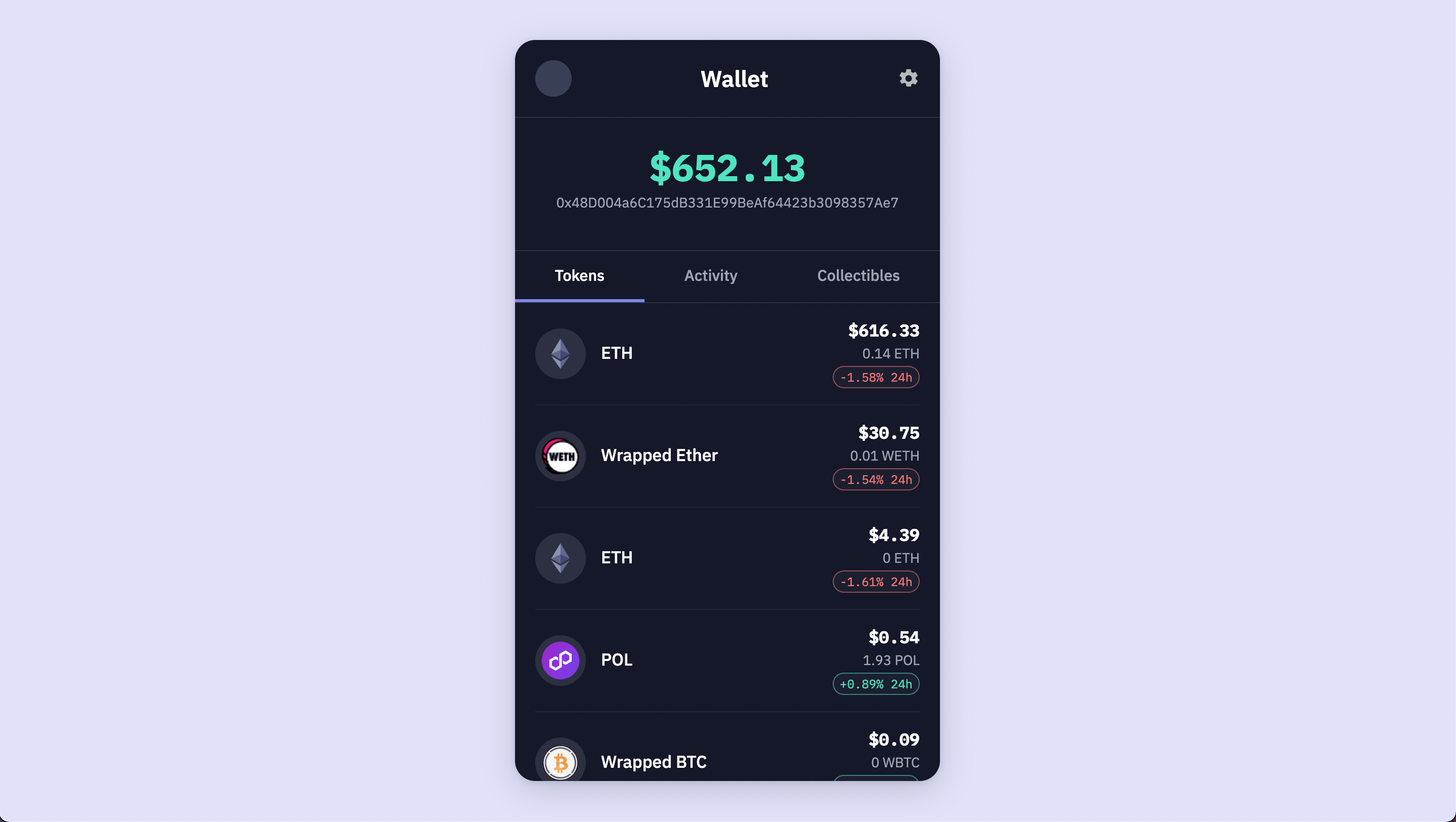
<Frame caption="Token balances with twenty four hour price change indicators showing gains and losses.">
  <img src="https://mintcdn.com/sim-dune/aQ2t6TNs_8fGyG4q/images/wallet-ui/wallet-historical-prices.png?fit=max&auto=format&n=aQ2t6TNs_8fGyG4q&q=85&s=85260c86f246076b21249fd56b57cf12" className="mx-auto" style={{ width:"100%" }} alt="" title="" width="2878" height="1624" data-path="images/wallet-ui/wallet-historical-prices.png" />
</Frame>

<Note>
  To learn more about historical prices, visit the [historical prices section](/evm/balances#historical-prices) in the Balances API documentation.
</Note>

### Understanding historical price data

When you pass the `historical_prices` query parameter, the API accepts a comma separated list of hour offsets such as `1,6,24`. Each token in the response will then include a `historical_prices` array. Each entry contains an `offset_hours` value that indicates how many hours ago the price was recorded and a `price_usd` value that represents the token price at that time.

### Create price utilities

Add a small utility module to calculate percentage changes and format them for display. Create `utils/prices.js` and include the following code.

```javascript utils/prices.js theme={null}
export const pct = (curr, past) =>
    curr == null || past == null || past === 0 ? null : ((curr - past) / past) * 100;

export const priceAt = (hist, h) =>
    Array.isArray(hist) ? (hist.find(p => p && p.offset_hours === h)?.price_usd) : undefined;

export const change1h = (price, hist) => pct(price, priceAt(hist, 1));
export const change6h = (price, hist) => pct(price, priceAt(hist, 6));
export const change24h = (price, hist) => pct(price, priceAt(hist, 24));

export const formatSignedPercent = (x) =>
    x == null ? '—' : `${x >= 0 ? '+' : ''}${x.toFixed(2)}%`;
```

These utility functions are necessary because the API returns only raw prices at specific times. You need these utilities to convert the price differences into percentage changes for display.

### Request historical prices in your balances call

Update `getWalletBalances` to optionally include historical prices. Only request this data when viewing the tokens tab to keep responses fast.

```javascript server.js (getWalletBalances with historical prices) [expandable] {5,9,16,17,18,19,20,21,22,23,24} theme={null}
/**
 * Fetch wallet balances. Optionally include historical prices for deltas.
 * @param {string} walletAddress
 * @param {{ includeHistoricalPrices?: boolean }} [options]
 */
async function getWalletBalances(walletAddress, options = {}) {
    const { includeHistoricalPrices = false } = options;
    if (!walletAddress) return [];

    // Construct the query parameters
    // metadata=url,logo fetches token URLs and logo images
    // exclude_spam_tokens filters out known spam tokens
    const baseParams = new URLSearchParams({
        'metadata': 'url,logo'
    });
    if (includeHistoricalPrices) {
        baseParams.set('historical_prices', '1,6,24');
    }
    const queryParams = `${baseParams.toString()}&exclude_spam_tokens`;

    const url = `https://api.sim.dune.com/v1/evm/balances/${walletAddress}?${queryParams}`;

    try {
        const response = await fetch(url, {
            headers: {
                'X-Sim-Api-Key': SIM_API_KEY,
                'Content-Type': 'application/json'
            }
        });

        if (!response.ok) {
            const errorBody = await response.text();
            console.error(`API request failed with status ${response.status}: ${response.statusText}`, errorBody);
            throw new Error(`API request failed: ${response.statusText}`);
        }

        const data = await response.json();
        return (data.balances || []).map(token => {
            const numericAmount = parseFloat(token.amount) / Math.pow(10, parseInt(token.decimals));
            const numericValueUSD = parseFloat(token.value_usd);
            const valueUSDFormatted = numbro(numericValueUSD).format('$0,0.00');
            const amountFormatted = numbro(numericAmount).format('0,0.[00]A');

            return {
                ...token,
                valueUSDFormatted,
                amountFormatted
            };
        }).filter(token => token.symbol !== 'RTFKT');

    } catch (error) {
        console.error("Error fetching wallet balances:", error.message);
        return [];
    }
}
```

This change adds an optional `includeHistoricalPrices` parameter, conditionally appends `historical_prices=1,6,24` to the request, and preserves the existing formatting behavior.

### Make price utilities available to the template

Import the utilities in `server.js`, request historical prices when the tokens tab is active, and pass the helpers into the template render context.

```javascript server.js (imports and route updates) [expandable] {4,18,30,49} theme={null}
import express from 'express';
import numbro from 'numbro';
import dotenv from 'dotenv';
import * as priceUtils from './utils/prices.js';
import path from 'path';
import { fileURLToPath } from 'url';

// ... existing setup code ...

app.get('/', async (req, res) => {
    const { 
        walletAddress = '',
        tab = 'tokens'
    } = req.query;

    let tokens = [];
    let totalWalletUSDValue = 0;
    let errorMessage = null;

    if (walletAddress) {
        try {
            const includeHistorical = tab === 'tokens';
            tokens = await getWalletBalances(walletAddress, { includeHistoricalPrices: includeHistorical });

            if (tokens && tokens.length > 0) {
                tokens.forEach(token => {
                    const individualValue = parseFloat(token.value_usd);
                    if (!isNaN(individualValue)) {
                        totalWalletUSDValue += individualValue;
                    }
                });
            }
            totalWalletUSDValue = numbro(totalWalletUSDValue).format('$0,0.00');

        } catch (error) {
            console.error("Error in route handler:", error);
            errorMessage = "Failed to fetch wallet data. Please try again.";
        }
    }

    res.render('wallet', {
        walletAddress: walletAddress,
        currentTab: tab,
        totalWalletUSDValue: totalWalletUSDValue,
        tokens: tokens,
        activities: [],
        collectibles: [],
        errorMessage: errorMessage,
        priceUtils
    });
});
```

### Show twenty four hour change in the UI

Add a compact badge below the amount display for each token. Insert this snippet in `views/wallet.ejs` within the tokens list item, after the amount text.

```ejs views/wallet.ejs (price change badges) theme={null}
<% if (typeof token.price_usd === 'number' && Array.isArray(token.historical_prices)) { %>
    <%
        const d24 = priceUtils.change24h(token.price_usd, token.historical_prices);
        const d24Text = priceUtils.formatSignedPercent(d24);
        const badgeClass = d24 == null ? 'neutral' : (d24 >= 0 ? 'pos' : 'neg');
    %>
    <% if (d24 != null) { %>
        <div class="price-delta-badges">
            <span class="delta-badge <%= badgeClass %>"><%= d24Text %> 24h</span>
        </div>
    <% } %>
<% } %>
```

### Style the badges

Add these styles to `public/styles.css` so the badges match the existing design system.

```css public/styles.css (price change styles) [expandable] theme={null}
.price-delta-badges {
    display: flex;
    gap: 6px;
    justify-content: flex-end;
    margin-top: 4px;
}

.delta-badge {
    font-family: var(--font-mono);
    font-size: 0.75em;
    padding: 2px 6px;
    border-radius: 999px;
    border: 1px solid var(--color-border-secondary);
    background: rgba(255,255,255,0.03);
    color: var(--color-text-muted);
}

.delta-badge.pos { 
    color: var(--color-accent-green); 
    border-color: rgba(80, 227, 194, 0.5); 
}

.delta-badge.neg { 
    color: var(--color-accent-red); 
    border-color: rgba(255, 120, 117, 0.5); 
}

.delta-badge.neutral { 
    color: var(--color-text-muted); 
}
```

<Warning>
  Historical prices are not available for every token. If the API does not return historical data for a token, the badge will not appear and the layout remains consistent.
</Warning>

## Conclusion

You have successfully set up the basic structure of your multichain wallet and integrated Sim APIs `Balances API` endpoint to display realtime token balances and total portfolio value.
In the next guide, [Add Account Activity](/evm/add-account-activity), we will enhance this wallet by adding a transaction history feature in the UI using the [Activity API](/evm/activity).