> ## Documentation Index
> Fetch the complete documentation index at: https://docs.sim.dune.com/llms.txt
> Use this file to discover all available pages before exploring further.

# Add Account Activity

> Expand your realtime crypto wallet by integrating a dynamic feed of onchain activity.

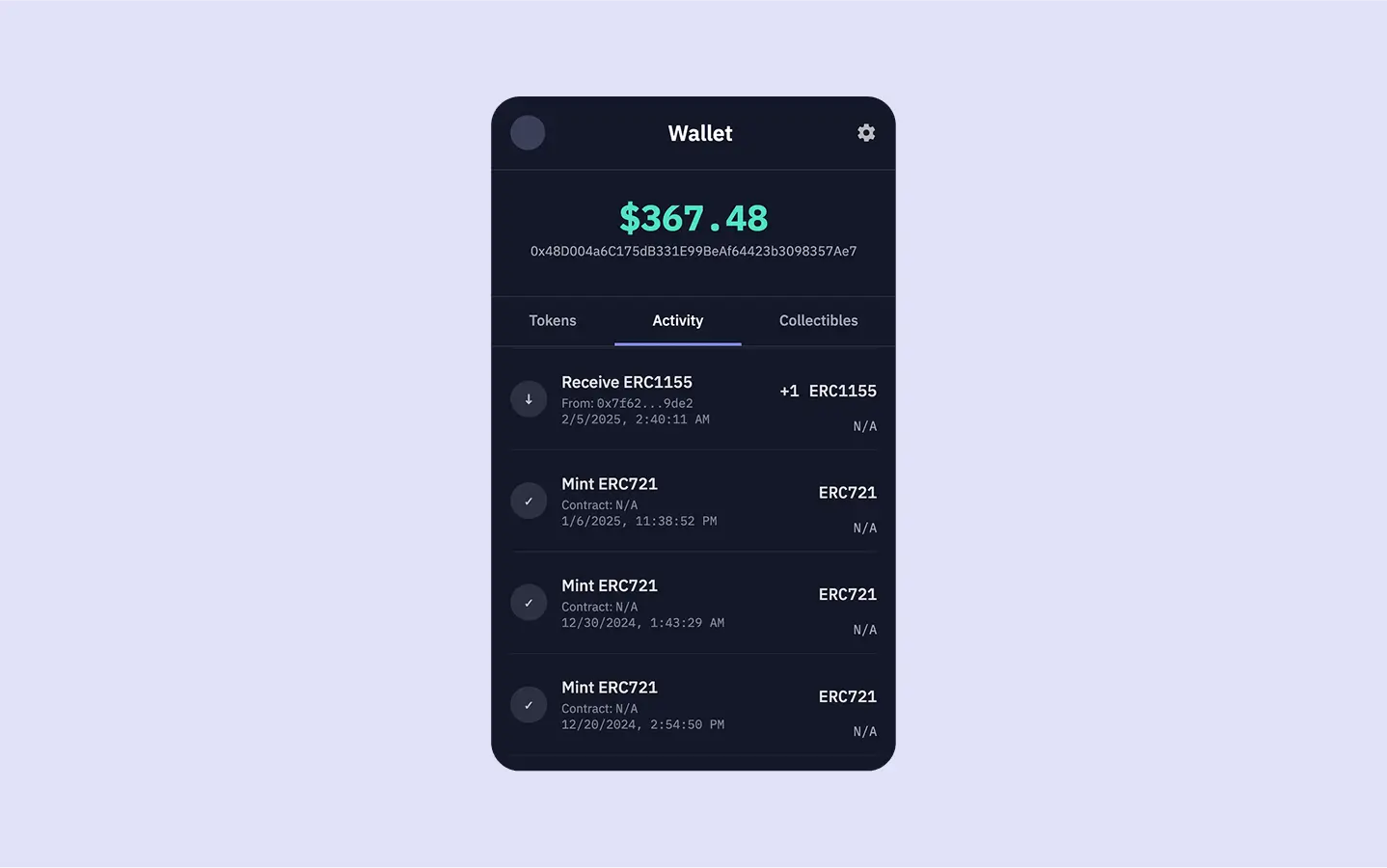
<Frame caption="Show all onchain activity for a wallet address in the 'Activity' tab of our app.">
  <img src="https://mintcdn.com/sim-dune/FaNfto3J8NMXXVaa/images/apis/Activity.webp?fit=max&auto=format&n=FaNfto3J8NMXXVaa&q=85&s=b4bb936073cc55a57f498560bbfaaa9b" className="mx-auto" style={{ width:"100%" }} alt="" title="" width="1438" height="900" data-path="images/apis/Activity.webp" />
</Frame>

Now that you have a wallet capable of showing realtime token balances and total portfolio value, let's enhance it by adding an *Activity* tab.

A key feature for any wallet is the ability to view past transaction activity.
This includes native currency transfers, ERC20 token movements, NFT transfers, and decoded interactions with smart contracts.
The [Activity API](/evm/activity) provides a comprehensive, realtime feed of this onchain activity, letting you implement this functionality with a single API request across 60+ EVM chains.

<Columns cols={2}>
  <Card title="View Source Code" icon="github" href="https://github.com/duneanalytics/sim-guides/tree/main/wallet-ui" horizontal>
    Access the complete source code for this wallet on GitHub
  </Card>

  <Card title="Try Live Demo" icon="globe" href="https://sim-guides.vercel.app/?walletAddress=0x48D004a6C175dB331E99BeAf64423b3098357Ae7" horizontal>
    Interact with the finished wallet app
  </Card>
</Columns>

<Note>
  This guide assumes you've completed the first guide, [Build a Realtime Wallet](/evm/build-a-realtime-wallet).
  Your project should already be set up to fetch and display token balances.
</Note>

## See It in Action

You can see the activity feed in action by trying the live demo below. Click on the "Activity" tab to explore transaction history for the sample wallet:

<iframe src="https://sim-guides.vercel.app/?walletAddress=0x48D004a6C175dB331E99BeAf64423b3098357Ae7&tab=activity" className="w-full rounded-xl border border-gray-200 dark:border-gray-700" style={{ height: "800px" }} title="Live Wallet Demo - Activity Tab" frameBorder="0" allow="clipboard-write; encrypted-media" allowFullScreen />

## Fetch Wallet Activity

Let's start by adding a new `getWalletActivity` async function to our `server.js` file to fetch activity data from Sim APIs.

```javascript server.js (getWalletActivity) theme={null}
async function getWalletActivity(walletAddress, limit = 25) { // Default to fetching 25 activities
    if (!walletAddress) return [];

    // The Activity API is currently in beta.
    // We add a 'limit' query parameter to control how many activities are returned.
    const url = `https://api.sim.dune.com/v1/evm/activity/${walletAddress}?limit=${limit}`;

    try {
        const response = await fetch(url, {
            headers: {
                'X-Sim-Api-Key': SIM_API_KEY, // Your API key from .env
                'Content-Type': 'application/json'
            }
        });

        if (!response.ok) {
            const errorBody = await response.text();
            console.error(`Activity API request failed with status ${response.status}: ${response.statusText}`, errorBody);
            throw new Error(`Activity API request failed: ${response.statusText}`);
        }

        const data = await response.json();
        // The API returns activity items in the 'activity' key of the JSON response.
        return data.activity || []; 
    } catch (error) {
        console.error("Error fetching wallet activity:", error.message);
        return []; // Return empty array on error
    }
}
```

The function creates the request URL for the `/v1/evm/activity/{address}` endpoint, adding the `limit` as a query parameter.
The [Activity API](/evm/activity) conveniently packages the transaction data within an `activity` array in the response.
The array provides rich context for each event, such as `block_time`, `transaction_hash`, `from` and `to` addresses, `value`, `value_usd`, and more.

<Note>
  The [Activity API](/evm/activity) supports pagination via `offset` and `limit` query parameters. For a production wallet, you might implement infinite scrolling or "Load More" buttons to fetch subsequent pages of activity.
</Note>

## Add Activity into the Server Route

Next, modify the `app.get('/')` route handler, add a call to `getWalletActivity`, and include its results in the data passed to `res.render`.

```javascript server.js (app.get('/') updated for activity) {16, 18, 45} theme={null}
app.get('/', async (req, res) => {
    const { 
        walletAddress = '',
        tab = 'tokens'
    } = req.query;

    let tokens = [];
    let activities = [];
    let collectibles = [];
    let totalWalletUSDValue = 0;
    let errorMessage = null;

    if (walletAddress) {
        try {

            [tokens, activities] = await Promise.all([
                getWalletBalances(walletAddress),
                getWalletActivity(walletAddress, 25) // Fetching 25 recent activities
            ]);

            // Calculate the total USD value from the fetched tokens
            if (tokens && tokens.length > 0) {
                tokens.forEach(token => {
                    let individualValue = parseFloat(token.value_usd);
                    if (!isNaN(individualValue)) {
                        totalWalletUSDValue += individualValue;
                    }
                });
            }
            
            totalWalletUSDValue = numbro(totalWalletUSDValue).format('$0,0.00');

        } catch (error) {
            console.error("Error in route handler:", error);
            errorMessage = "Failed to fetch wallet data. Please try again.";
            // tokens will remain empty, totalWalletUSDValue will be 0
        }
    }

    res.render('wallet', {
        walletAddress: walletAddress,
        currentTab: tab,
        totalWalletUSDValue: totalWalletUSDValue, // We'll calculate this in the next section
        tokens: tokens,
        activities: activities, // Placeholder for Guide 2
        collectibles: [], // Placeholder for Guide 3
        errorMessage: errorMessage
    });
});
```

Our updated `app.get('/')` route handler now handles fetching of both token balances and wallet activity.
Both the `tokens` and the newly fetched `activities` arrays are then passed to the `res.render` method.
This makes the complete dataset available to our `wallet.ejs` template, enabling it to populate both the "Tokens" and "Activity" tabs with relevant, realtime onchain information.

## Show Activity in the Frontend

The final step is to update our `views/wallet.ejs` template to render the fetched activity data within the "Activity" tab.

CTRL+F for `id="activity"` and locate the section for the *Activity* tab.
It currently contains a placeholder paragraph.
Replace that entire `div` with the following EJS code:

```ejs views/wallet.ejs (Activity tab content) [expandable] theme={null}
<!-- Activity Tab Pane (for Guide 2) -->
<div id="activity" class="tab-pane <%= currentTab === 'activity' ? 'active' : '' %>">
<% if (activities && activities.length > 0) { %>
    <% activities.forEach(activity => { %>
        <div class="list-item">
            <div class="item-icon-placeholder">
                <% if (activity.type === 'receive') { %>
                    ↓
                <% } else if (activity.type === 'send') { %>
                    ↑
                <% } else if (activity.type === 'call') { %>
                    ⇆ <!-- Icon for contract call -->
                <% } else { %>
                    ✓ <!-- Generic icon for other types -->
                <% } %>
            </div>
            <div class="item-info">
                <% 
                    let activityTitle = activity.type.charAt(0).toUpperCase() + activity.type.slice(1);
                    let activityColorClass = activity.type; // Used for potential CSS styling

                    if (activity.type === 'call' && activity.function && activity.function.name) {
                        activityTitle = `Call: ${activity.function.name}`;
                        activityColorClass = 'call';
                    } else if (activity.type === 'receive' || activity.type === 'send') {
                        const tokenSymbol = activity.token_metadata?.symbol || 
                                            (activity.asset_type === 'native' ? 
                                                (activity.chain_id === 1 || activity.chain_id === 8453 || activity.chain_id === 10 ? 'ETH' : 'Native') : 
                                                'Token');
                        activityTitle = `${activity.type === 'receive' ? 'Received' : 'Sent'} ${tokenSymbol}`;
                    }
                %>
                <p class="item-name activity-direction <%= activityColorClass %>"><%= activityTitle %></p>
                
                <p class="activity-address">
                    <% 
                        let partyLabel = '', partyAddress = '';
                        if (activity.type === 'receive') { 
                            partyLabel = 'From'; 
                            partyAddress = activity.from; 
                        } else if (activity.type === 'send') { 
                            partyLabel = 'To'; 
                            partyAddress = activity.to; 
                        } else if (activity.type === 'call') { 
                            partyLabel = 'Contract'; 
                            partyAddress = activity.to; 
                        } else { 
                            partyLabel = 'With'; 
                            partyAddress = activity.to || activity.from || 'Unknown'; 
                        }
                    %>
                    
                    <% if (partyAddress && partyAddress !== 'Unknown') { %>
                        <%= partyLabel %> 
                        <span class="mono">
                            <%= partyAddress.substring(0, 6) %>...<%= partyAddress.substring(partyAddress.length - 4) %>
                        </span>
                    <% } else { %>
                        Interaction
                    <% } %>
                </p>
                
                <p class="activity-timestamp">
                    <span class="mono"><%= new Date(activity.block_time).toLocaleDateString(); %></span>
                </p>
            </div>
            <div class="item-value-right">
                <% if (activity.type === 'call') { %>
                    <p class="activity-amount-right <%= activityColorClass %>" style="font-family: var(--font-primary);">
                        Interaction
                    </p>
                <% } else if (activity.value) { %>
                    <p class="activity-amount-right <%= activityColorClass %>">
                        <%
                        let amountDisplay = '0';
                        const decimals = typeof activity.token_metadata?.decimals === 'number' ? activity.token_metadata.decimals : 18;
                        if (decimals !== null) {
                            const valueStr = activity.value.toString();
                            const padded = valueStr.padStart(decimals + 1, '0');
                            let intPart = padded.slice(0, -decimals);
                            let fracPart = padded.slice(-decimals).replace(/0+$/, '');
                            if (!intPart) intPart = '0';
                            if (fracPart) {
                                amountDisplay = `${intPart}.${fracPart}`;
                            } else {
                                amountDisplay = intPart;
                            }
                            const amountNum = parseFloat(amountDisplay);
                            if (amountNum > 0 && amountNum < 0.0001) {
                                amountDisplay = '<0.0001';
                            }
                            if (amountNum > 1e12 || amountDisplay.length > 12) {
                                amountDisplay = amountNum.toExponential(2);
                            }
                        } else {
                            amountDisplay = activity.id || String(activity.value);
                        }
                        // Clean up the symbol: remove $ and anything after space/dash/bracket, and limit length
                        let symbol = activity.token_metadata?.symbol || (activity.asset_type === 'native'
                            ? (activity.chain_id === 1 || activity.chain_id === 8453 || activity.chain_id === 10 ? 'ETH' : 'NTV')
                            : (activity.id ? '' : 'Tokens'));
                        if (symbol) {
                            symbol = symbol.replace('$', '').split(/[\s\-\[]/)[0].substring(0, 8);
                        }
                        %>
                        <% if (activity.type === 'receive') { %>+<% } else if (activity.type === 'send') { %>-<% } %><%= amountDisplay %> <span class="mono"><%= symbol %></span>
                    </p>
                <% } %>
            </div>
        </div>
    <% }); %>
<% } else if (walletAddress) { %>
    <p style="text-align: center; padding-top: 30px; color: var(--color-text-muted);">No activity found for this wallet.</p>
<% } else { %>
    <p style="text-align: center; padding-top: 30px; color: var(--color-text-muted);">Enter a wallet address to see activity.</p>
<% } %>
</div>
```

This EJS transforms the raw data from the Activity API into an intuitive and visual transaction history.
Here's a breakdown of how it processes each activity item:

* A **list entry** is generated for each transaction.
* An **icon** visually indicates the transaction's nature: receive (↓), send (↑), or contract call (⇆).
* A **descriptive title** is dynamically constructed using the `activity.type` (and `activity.function.name` for contract calls).
* The transaction's **timestamp** (`block_time`) is converted to a readable local date/time string.
* The **chain ID** (`chain_id`) is displayed, providing important multichain context.

Beyond these descriptive elements, the template also focuses on presenting the value and financial aspects of each transaction:

* The **transaction amount** (raw `value`) is converted into a user-friendly decimal format (e.g., "1.5 ETH"). This conversion utilizes the `decimals` property from `token_metadata`.
* For **NFTs**, if a standard decimal value isn't applicable, the template displays the `token_id`.
* The **USD value** (`value_usd`), if provided by the API, is formatted to two decimal places and shown, giving a sense of the transaction's monetary worth.

***

Restart your server by running `node server.js` and refresh the app in the browser.
When you click on the *Activity* tab, you should now see a list of the latest transactions, similar to the screenshot at the beginning of this guide.

## Conclusion

You successfully added a realtime, fully functional activity feed to your multichain wallet with a single API request.
In the next and final guide of this series, [Display NFTs & Collectibles](/evm/show-nfts-collectibles), we will complete the wallet by adding support for viewing NFT collections.
